Every modern web application is really two applications talking to each other: a frontend that people see and a backend that holds the data. The API sitting between them decides how that conversation happens — how many requests the browser makes, how much data travels over the network, how easy it is to add a new feature, and how painful it is to cache, secure, and debug everything later.
For more than a decade, REST has been the default answer. GraphQL arrived as a deliberate alternative built around a different idea: let the client ask for exactly the data it needs, in one request, from a single endpoint. This guide walks through how each approach actually works, where each one shines, where each one hurts, and how to pick the right one for the project in front of you — not the one that's trending.
1. What Is a REST API?
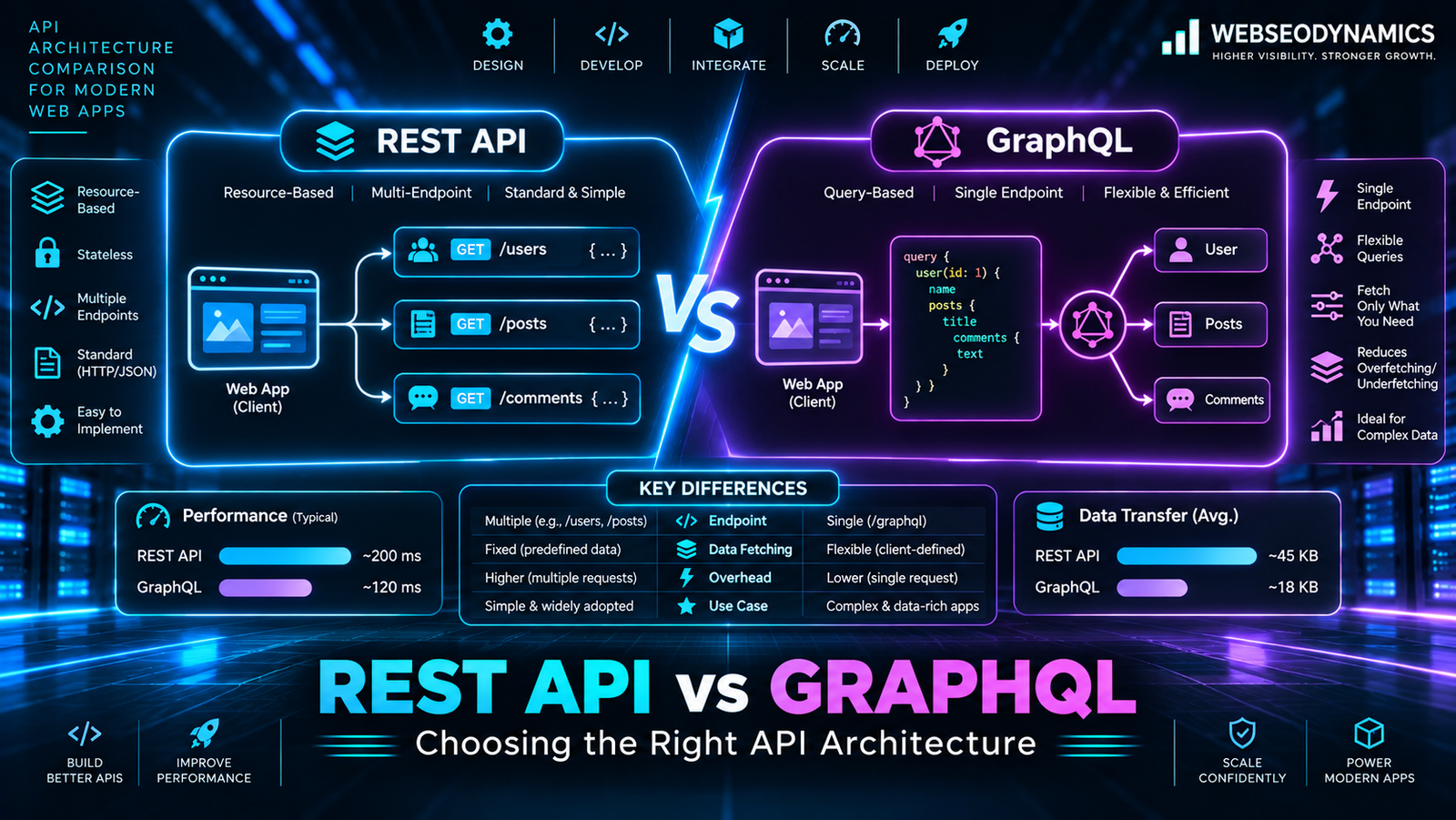
REST (Representational State Transfer) is an architectural style rather than a strict specification. A REST API models your application as a collection of resources — users, products, orders, posts — and gives each one its own URL. You interact with those resources using standard HTTP methods, and the server responds with a representation of the resource, almost always as JSON today.
- GET
/api/products— list products - GET
/api/products/42— fetch one product - POST
/api/products— create a product - PUT / PATCH
/api/products/42— replace or update a product - DELETE
/api/products/42— remove a product
REST leans heavily on what HTTP already provides. Status codes (200, 201, 404, 422, 500) communicate the outcome. Headers like Cache-Control and ETag handle caching. Each request is stateless — it carries everything the server needs, which makes REST services straightforward to scale horizontally behind a load balancer.
The important consequence: in REST, the server decides the shape of the response. If /api/products/42 returns twenty fields, every client gets twenty fields, whether it needs them or not.
2. What Is GraphQL?
GraphQL is a query language for APIs and a runtime for executing those queries, originally developed at Facebook and open-sourced in 2015. Instead of many resource URLs, a GraphQL API typically exposes a single endpoint (usually /graphql), and the client sends a query describing exactly which fields it wants.
Three building blocks define every GraphQL API:
Schema
A strongly typed contract describing every type, field, and relationship the API offers. Clients and servers both validate against it.
Queries & Mutations
Queries read data; mutations change it. Subscriptions add real-time updates, usually over WebSockets.
Resolvers
Server-side functions that fetch the data for each field — from a database, another API, a cache, or anywhere else.
The key inversion: in GraphQL, the client decides the shape of the response. The server publishes what's possible through the schema; each client picks what it actually needs.
3. The Same Feature, Built Both Ways
Imagine a product page that shows a product's name and price, its three latest reviews, and each reviewer's display name. Here's how a frontend would fetch that data from each type of API.
With REST
// 1. Fetch the product
const product = await fetch('/api/products/42').then(r => r.json());

// 2. Fetch its reviews
const reviews = await fetch('/api/products/42/reviews?limit=3')
  .then(r => r.json());

// 3. Fetch each reviewer (one request per review)
const users = await Promise.all(
  reviews.map(review =>
    fetch(`/api/users/${review.userId}`).then(r => r.json())
  )
);
That's five HTTP requests, and each response likely includes fields the page never uses — the product's full description, inventory data, the user's email preferences, and so on. These are the two classic REST pain points:
- Over-fetching — receiving more data than the view needs, which wastes bandwidth, especially on mobile connections.
- Under-fetching — one endpoint not returning enough, forcing extra round trips (the “N+1 requests” pattern shown above).
REST teams usually solve this by adding a purpose-built endpoint (/api/product-page/42) or query options like ?include=reviews.user&fields=name,price. Both work well — but every new screen tends to need new backend work.
With GraphQL
query ProductPage {
  product(id: "42") {
    name
    price
    reviews(last: 3) {
      rating
      comment
      author {
        displayName
      }
    }
  }
}
One request, and the response mirrors the query exactly:
{
  "data": {
    "product": {
      "name": "Wireless Headphones",
      "price": 89.99,
      "reviews": [
        { "rating": 5, "comment": "Great sound", "author": { "displayName": "Ravi" } },
        { "rating": 4, "comment": "Comfortable", "author": { "displayName": "Meera" } },
        { "rating": 5, "comment": "Worth it",    "author": { "displayName": "Sam" } }
      ]
    }
  }
}
The frontend team can now change what this page shows — add a review date, drop the price — without asking the backend team for a new endpoint, as long as the field already exists in the schema.
Note: GraphQL doesn't remove the N+1 problem — it moves it to the server. If the author resolver runs one database query per review, the server makes the same number of lookups the REST client did. The standard fix is batching with a tool like DataLoader, which collects all requested user IDs and loads them in a single query.
4. Head-to-Head Comparison
| Aspect | REST | GraphQL |
|---|---|---|
| Endpoints | Many — one per resource | Usually one |
| Response shape | Fixed by the server | Chosen by the client |
| Typing / contract | Optional (OpenAPI is common but not required) | Built in — the schema is mandatory |
| HTTP caching | Native — browsers, CDNs, and proxies cache GET requests by URL | Harder — most queries are POSTs to one URL; relies on client-side caches or persisted queries |
| Error handling | HTTP status codes | Often 200 OK with an errors array; partial data is possible |
| Versioning | Typically /v1, /v2 |
Evolve the schema; mark old fields @deprecated |
| File uploads | Simple multipart requests | Not in the core spec; usually handled by a separate REST endpoint or signed upload URL |
| Learning curve | Low — it's just HTTP | Moderate — schema design, resolvers, and client tooling to learn |
| Tooling | curl, Postman, Swagger/OpenAPI generators | GraphiQL, Apollo, Relay, urql, code generators for typed clients |
5. Performance and Caching
Neither approach is inherently faster. Performance depends on how many round trips a screen needs, how much data each one carries, and how much of it can be served from a cache instead of hitting your servers.
Where REST Wins: The HTTP Cache
Because every REST resource has its own URL, the entire web's caching infrastructure works out of the box. A public endpoint can return a header like this and let browsers and CDNs do the heavy lifting:
Cache-Control: public, max-age=300, stale-while-revalidate=60
ETag: "a1b2c3"
For read-heavy public data — product catalogs, blog posts, pricing pages — this edge caching is extremely hard to beat, and it costs almost nothing to implement.
Where GraphQL Wins: Fewer, Leaner Requests
On complex, data-dense screens — dashboards, feeds, mobile apps on slow networks — collapsing five or six round trips into one and trimming unused fields can noticeably cut load time. GraphQL clients like Apollo and Relay also keep a normalized cache in the browser, so an object fetched on one screen can be reused instantly on another.
Closing the Caching Gap in GraphQL
- Persisted queries: The client sends a short hash instead of the full query text. Combined with GET requests, this makes responses CDN-cacheable and shrinks request size.
- Server-side response caching: Cache resolver results or whole responses with per-field cache hints.
- DataLoader batching: Prevents resolvers from hammering the database with one query per item.
6. Security Considerations
Both styles need the same fundamentals: HTTPS everywhere, proper authentication (sessions, JWTs, or OAuth), input validation, and authorization checks on every piece of data returned. The differences lie in what can go wrong. For the wider picture, see our OWASP Top 10 guide for developers.
REST
The surface is predictable — a known list of endpoints and methods — so rate limiting, Web Application Firewall rules, and per-route permissions are simple to apply. The most common REST flaw is broken object-level authorization: an endpoint like /api/orders/1007 that returns any order to any logged-in user who changes the ID.
GraphQL
Flexibility for clients is also flexibility for attackers. A single, deeply nested query can ask the server for an enormous amount of work. Production GraphQL APIs should add:
- Query depth limits — reject queries nested beyond a sensible level.
- Complexity or cost analysis — assign a cost to each field and reject queries that exceed a budget.
- Field-level authorization — check permissions inside resolvers, not just at the endpoint, since one endpoint serves everything.
- Restricted introspection — consider disabling schema introspection in production for private APIs.
- Allow-listed (persisted) queries — for first-party apps, only accept queries your own frontend is known to send.
7. When to Choose Which
Choose REST when…
- Your data is resource-shaped and screens map closely to those resources.
- You're building a public API that third parties will consume.
- CDN and browser caching of public data matter a lot.
- The app is small to medium, or the team is new to API design.
- You handle lots of file uploads, downloads, or webhooks.
Choose GraphQL when…
- Several clients (web, iOS, Android) need different slices of the same data.
- Screens combine deeply related data from many sources.
- Frontend teams iterate quickly and want to avoid waiting on new endpoints.
- You want a single typed gateway in front of multiple microservices.
- Bandwidth on mobile networks is a real constraint.
A useful rule of thumb: if you can describe your app as “forms and lists over a database,” REST will almost always be simpler and perfectly fast. If you find yourself building a growing pile of custom endpoints just to feed specific screens, that's a strong signal GraphQL may pay for its added complexity.
8. Using Both Together
This isn't an all-or-nothing decision. Many production systems combine the two:
- GraphQL as a gateway (Backend for Frontend): Existing REST microservices stay as they are, and a GraphQL layer sits in front, letting the frontend query across all of them through one schema.
- GraphQL for the app, REST for everything else: The product UI uses GraphQL, while file uploads, payment-provider webhooks, health checks, and public partner APIs stay REST.
- Gradual migration: New features ship on GraphQL resolvers that call the existing REST services internally, so nothing needs a risky rewrite.
It's also worth knowing the neighbours. tRPC gives end-to-end type safety for full-stack TypeScript apps without a schema language, and gRPC is a popular choice for high-performance service-to-service communication inside a backend. Neither replaces REST or GraphQL for every case, but both are worth considering for the right team.
9. Frequently Asked Questions
Is GraphQL replacing REST?
No. GraphQL has become a mainstream option, especially for complex frontends and multi-client products, but REST remains the most widely used API style on the web. Most teams choose based on the project, and many run both side by side.
Is GraphQL faster than REST?
Not by default. GraphQL can reduce round trips and payload size for complex screens, while REST benefits from simple, highly effective HTTP caching. A well-designed API in either style will outperform a poorly designed one in the other.
Do I need a special database to use GraphQL?
No. GraphQL is database-agnostic. Resolvers can read from MySQL, PostgreSQL, MongoDB, an external REST API, or a mix of all of them. The schema describes your API, not your storage.
Can I use GraphQL with PHP or WordPress?
Yes — and if you'd rather start with REST, our tutorial on building a REST API with PHP and MySQL walks through it step by step. Libraries such as webonyx/graphql-php and Lighthouse (for Laravel) bring GraphQL to PHP backends, and the WPGraphQL plugin adds a GraphQL API to WordPress — a common choice for headless WordPress sites with a React or Next.js frontend.
Which is better for a small business website?
For most small business sites, REST — or no custom API at all — is the simpler, cheaper choice. GraphQL becomes worthwhile when there are multiple apps, complex data relationships, or a frontend team that needs to move independently of the backend.
Conclusion
REST and GraphQL solve the same problem from opposite directions. REST keeps the server in control, embraces HTTP, and makes caching and public APIs simple. GraphQL hands control to the client, removes over- and under-fetching, and gives frontend teams a typed, self-documenting contract — in exchange for more server-side care around performance, caching, and security.
The right choice comes from your actual requirements: how many clients you serve, how connected your data is, how much you depend on edge caching, and what your team already knows. Start with the simplest architecture that meets today's needs, design it cleanly, and remember that adding a GraphQL layer on top of solid REST services later is a well-trodden path.
Planning the API Behind Your Next Web App?
At WebSeoDynamics, we design and build fast, secure REST and GraphQL APIs — and the frontends that use them — matched to your product, your team, and your growth plans.
Get a Free Consultation Today