Most websites aren't hacked by brilliant, targeted attacks. They're hacked by automated scanners that try the same handful of well-known weaknesses on millions of sites a day — an unescaped form field here, a forgotten admin page there, an outdated plugin somewhere else. The good news is that the same handful of habits closes most of those doors.
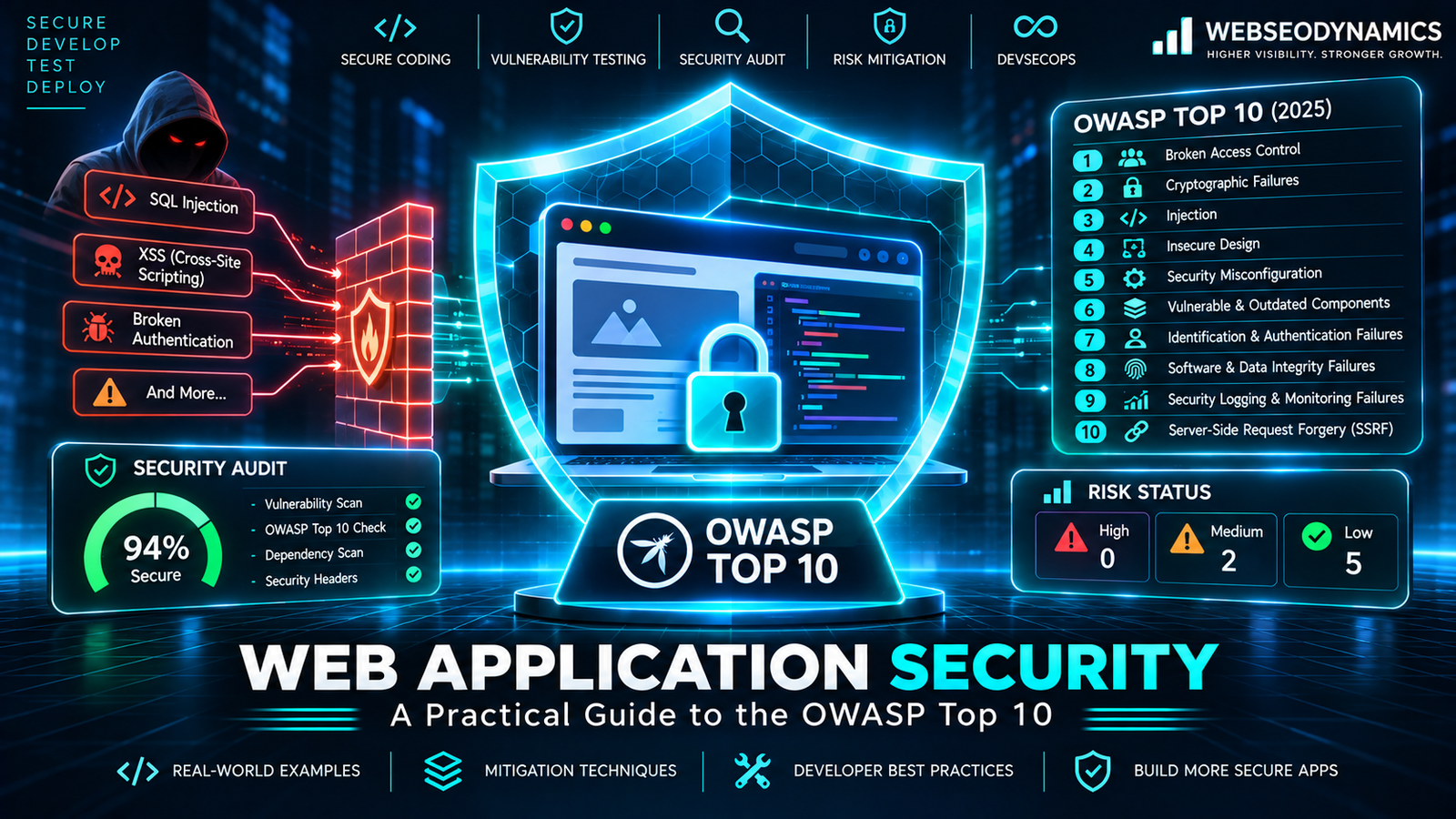
The OWASP Top 10 is the most widely referenced list of those weaknesses. Published by the Open Worldwide Application Security Project and based on data from real applications, its latest edition (2025) is the best starting map for any developer who wants to ship code that doesn't become tomorrow's breach headline. This guide goes through each category with plain explanations and concrete fixes you can apply in PHP, JavaScript, or any other stack.
A01. Broken Access Control
Number one for a reason. Access control means users can only see and do what they're permitted to. It breaks when the server trusts the client to tell it what's allowed — for example, by changing /account/orders/1007 to /account/orders/1008 and seeing someone else's order. This category also now includes Server-Side Request Forgery (SSRF), where an attacker tricks your server into fetching internal URLs.
// Vulnerable: anyone logged in can read any order
$stmt = $pdo->prepare("SELECT * FROM orders WHERE id = ?");
$stmt->execute([$_GET['id']]);

// Fixed: the order must belong to the current user
$stmt = $pdo->prepare("SELECT * FROM orders WHERE id = ? AND user_id = ?");
$stmt->execute([$_GET['id'], $_SESSION['user_id']]);
Fix it: deny by default; check ownership and role on the server for every request; never rely on hidden buttons or URLs as protection; and validate any URL your server fetches against an allow-list.
A02. Security Misconfiguration
Secure code can still run on an insecure setup. Common examples: detailed error messages and stack traces shown to visitors, directory listing enabled, default admin passwords, publicly reachable .env or .git folders, debug mode left on in production, and missing security headers.
Fix it: turn off display_errors in production and log errors instead; block access to dotfiles and config directories; remove sample files and unused services; and add security headers such as Content-Security-Policy and Strict-Transport-Security — our guide to CORS and security headers walks through each one with copy-ready examples.
A03. Software Supply Chain Failures
A modern app is mostly other people's code: Composer and npm packages, WordPress plugins, CDN scripts, build tools, and CI actions. Any of them can contain a known vulnerability, be abandoned, or — increasingly — be deliberately compromised by attackers who hijack a maintainer's account or publish look-alike packages.
Fix it: commit lock files (composer.lock, package-lock.json); run composer audit and npm audit regularly or automatically; remove packages and plugins you don't use; be wary of brand-new or barely-used packages; and use Subresource Integrity (SRI) hashes when loading scripts from a CDN. Automating these checks in a CI/CD pipeline means nobody has to remember to run them.
A04. Cryptographic Failures
Sensitive data exposed because it wasn't encrypted, or was protected with weak or broken methods: pages served over HTTP, passwords stored with MD5 or SHA-1, hard-coded encryption keys in source code, or personal data kept far longer than needed.
Fix it: HTTPS everywhere with HSTS; hash passwords with password_hash() (bcrypt) or Argon2id; keep keys and secrets in environment variables or a secrets manager, never in Git; and don't store data you don't need.
A05. Injection (SQL Injection and XSS)
Injection happens when user input is treated as code. The two most common forms on websites:
SQL Injection
// Vulnerable: input is glued into the query
$sql = "SELECT * FROM users WHERE email = '" . $_POST['email'] . "'";

// Fixed: prepared statement — input is always data, never SQL
$stmt = $pdo->prepare("SELECT * FROM users WHERE email = ?");
$stmt->execute([$_POST['email']]);
Cross-Site Scripting (XSS)
<!-- Vulnerable: a comment containing <script> runs in every visitor's browser -->
<p><?= $comment ?></p>

<!-- Fixed: escape on output -->
<p><?= htmlspecialchars($comment, ENT_QUOTES, 'UTF-8') ?></p>

// In JavaScript, prefer textContent over innerHTML for user data
element.textContent = userInput;
Fix it: prepared statements or an ORM for every query; escape output for its context (HTML, attribute, URL, JavaScript); let frameworks like React and Vue escape for you and avoid their raw-HTML escape hatches; and add a Content-Security-Policy as a second line of defence.
A06. Insecure Design
Some flaws aren't coding mistakes — the feature itself was designed unsafely. A password reset that only asks for an email and a birth date, a coupon that can be applied unlimited times, or a checkout that trusts the price sent from the browser are all design bugs that perfect code can't fix.
Fix it: for each feature, ask “how could someone abuse this?” before building it (lightweight threat modeling); recalculate prices and totals on the server; add rate limits to anything that could be automated; and write tests for the abuse cases, not just the happy path.
A07. Authentication Failures
Weak login systems: no protection against credential stuffing, allowing common passwords, session IDs that don't change after login, tokens that never expire, or “remember me” cookies that can be guessed. Fix it: rate-limit and monitor login attempts; check new passwords against known-breached lists; support multi-factor authentication or passkeys; and regenerate session IDs on login. We cover the mechanics in detail in API Authentication Explained: Sessions vs JWT vs OAuth 2.0.
A08. Software or Data Integrity Failures
Trusting code or data without verifying it hasn't been tampered with: auto-updates without signature checks, deserializing untrusted input (PHP's unserialize() on user data is a classic), or deployment pipelines that anyone can modify. Fix it: use JSON instead of native serialization for anything user-controlled; verify signatures and checksums; protect your main branch and deployment secrets; and require review before code reaches production.
A09. Security Logging and Alerting Failures
Many breaches go unnoticed for months simply because nobody was watching. If failed logins, permission errors, and admin actions aren't logged — or are logged but never alerted on — attacks can continue quietly. Fix it: log security-relevant events with the user, IP, and time; never log passwords, tokens, or card numbers; ship logs somewhere an attacker on the web server can't erase them; and set up alerts for unusual spikes.
A10. Mishandling of Exceptional Conditions
New in the 2025 list. When something unexpected happens — a database timeout, a malformed request, a third-party API failure — does your code fail safely? Common mistakes include showing raw errors to users, “failing open” (granting access when a permission check throws an error), and leaving half-finished transactions behind. Fix it: handle errors centrally; fail closed on security checks; use database transactions for multi-step changes; and return generic error messages to users while logging the details privately.
Developer Security Checklist
- ☑ Every query uses prepared statements
- ☑ Every output is escaped for its context
- ☑ Every request checks authorization, not just login
- ☑ HTTPS everywhere, with HSTS
- ☑ Passwords hashed with bcrypt or Argon2id
- ☑ Forms that change data have CSRF protection
- ☑ Security headers configured (CSP, HSTS, X-Content-Type-Options, frame-ancestors)
- ☑ Dependencies audited and updated on a schedule
- ☑ Secrets in environment variables, not in the repository
- ☑ Errors logged privately, never displayed in production
- ☑ File uploads checked for type and size, stored outside the web root
Frequently Asked Questions
Is the OWASP Top 10 a complete security standard?
No. It's an awareness document covering the most common and impactful risks. For a fuller checklist, OWASP's Application Security Verification Standard (ASVS) goes much deeper. The Top 10 is the right place to start, not the place to stop.
Does using a framework make my site secure?
Frameworks like Laravel, Symfony, Django, and Next.js handle many basics — escaping, CSRF tokens, prepared queries — by default. They can't fix access-control logic or insecure design, which are specific to your app, and they can be undermined by disabling their protections.
How often should I update dependencies?
Apply security patches as soon as they're released, and do routine updates at least monthly. Automated tools like Dependabot or Renovate can open update pull requests for you.
Is WordPress insecure?
WordPress core is actively maintained and reasonably secure. Most WordPress compromises come from outdated or poorly written plugins and themes, weak admin passwords, and neglected updates — supply chain and configuration problems from this very list.
Conclusion
Security isn't a feature you add at the end — it's a set of habits built into every query, every template, and every deploy. Treat all input as untrusted, check permissions on the server every time, keep dependencies and configuration tidy, and make sure you'd notice if something went wrong. Those habits alone eliminate the vast majority of the attacks that automated scanners try every day.
Worried About Your Website's Security?
At WebSeoDynamics, we build websites and web apps with security designed in from the start — and we can review and harden the site you already have.
Get a Free Consultation Today