PHP still powers a large share of the web, and it's an excellent language for building APIs: it's fast on modern versions, available on almost every host, and needs no build step. Yet many PHP tutorials teach patterns that are a decade out of date — string-concatenated SQL, no input validation, and errors that leak database details to the world.
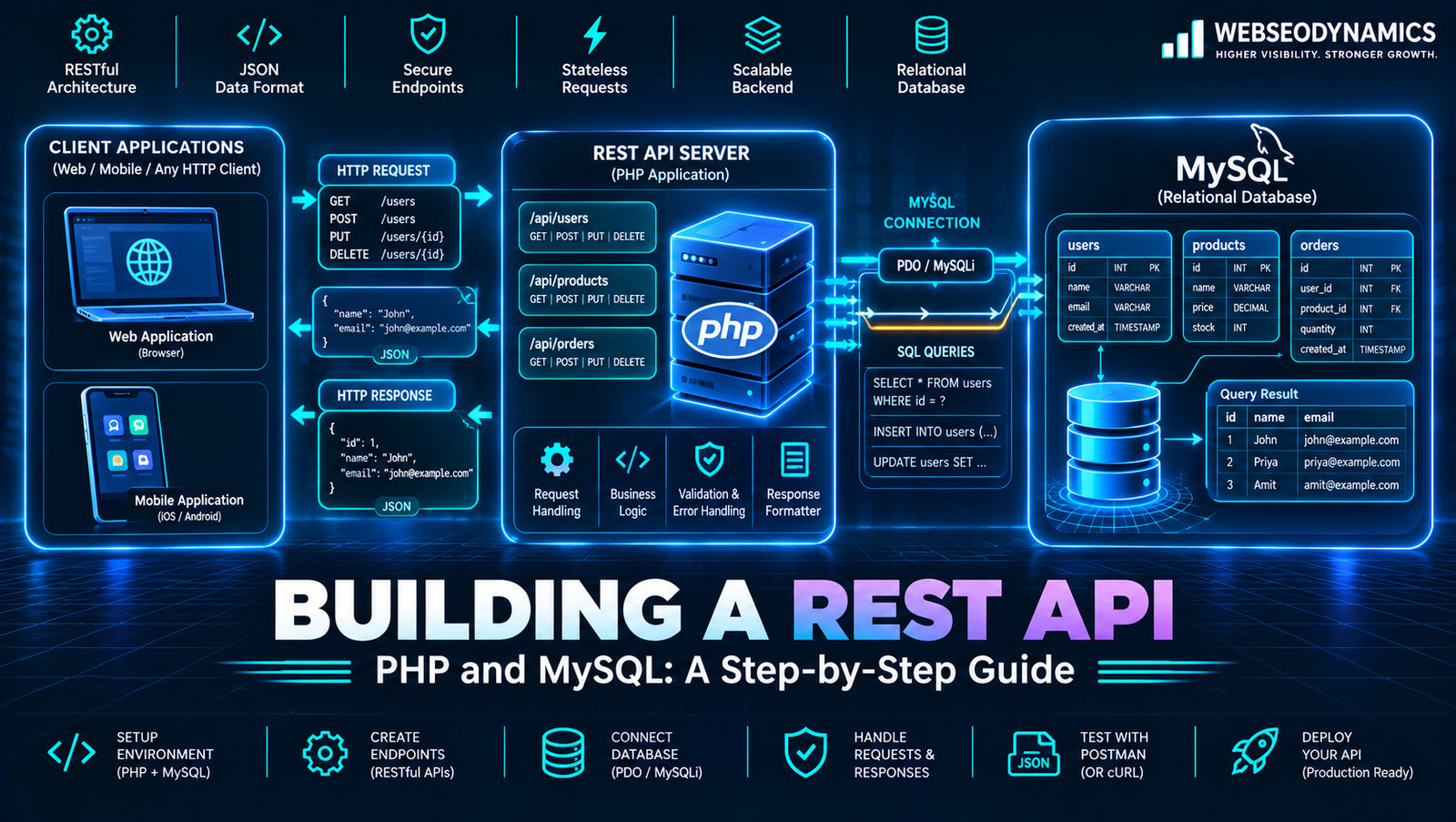
This guide builds a small but production-minded REST API for a tasks resource using plain PHP 8 and MySQL, with no framework. You'll get clean routing, prepared statements, JSON input and output, proper HTTP status codes, validation, and token authentication — the same fundamentals every framework uses under the hood. If you're new to REST itself, start with our explainer on REST API vs GraphQL.
1. Design the Endpoints First
Before writing code, decide what the API looks like from the outside. Use plural nouns for resources, HTTP methods for actions, and a version prefix so you can evolve the API later without breaking existing clients.
| Method | Endpoint | Action | Success code |
|---|---|---|---|
| GET | /api/v1/tasks | List tasks | 200 |
| GET | /api/v1/tasks/{id} | Get one task | 200 |
| POST | /api/v1/tasks | Create a task | 201 |
| PATCH | /api/v1/tasks/{id} | Update fields | 200 |
| DELETE | /api/v1/tasks/{id} | Delete a task | 204 |
2. Project Structure and Database
api/
├── public/
│   ├── index.php        # the only file the web server exposes
│   └── .htaccess
├── src/
│   ├── db.php           # PDO connection
│   ├── http.php         # JSON response helpers
│   └── tasks.php        # task handlers
└── .env                 # credentials — never committed or web-accessible
Pointing the web server at public/ means your source files and .env can never be downloaded directly. Create the table:
CREATE TABLE tasks (
    id          INT UNSIGNED AUTO_INCREMENT PRIMARY KEY,
    user_id     INT UNSIGNED NOT NULL,
    title       VARCHAR(200) NOT NULL,
    done        TINYINT(1)   NOT NULL DEFAULT 0,
    created_at  TIMESTAMP    NOT NULL DEFAULT CURRENT_TIMESTAMP,
    INDEX idx_user (user_id)
) ENGINE=InnoDB DEFAULT CHARSET=utf8mb4;
A relational database fits this data well — tasks belong to users and need consistent updates. For when a document store might fit better, see SQL vs NoSQL databases. Now the connection, with settings that matter:
<?php
// src/db.php
function db(): PDO {
    static $pdo = null;
    if ($pdo === null) {
        $pdo = new PDO(
            'mysql:host=' . getenv('DB_HOST') . ';dbname=' . getenv('DB_NAME') . ';charset=utf8mb4',
            getenv('DB_USER'),
            getenv('DB_PASS'),
            [
                PDO::ATTR_ERRMODE            => PDO::ERRMODE_EXCEPTION, // throw on errors
                PDO::ATTR_DEFAULT_FETCH_MODE => PDO::FETCH_ASSOC,
                PDO::ATTR_EMULATE_PREPARES   => false,                  // real prepared statements
            ]
        );
    }
    return $pdo;
}
3. Front Controller and Routing
Every request goes through one file. On Apache, rewrite all non-file requests to it:
# public/.htaccess
RewriteEngine On
RewriteCond %{REQUEST_FILENAME} !-f
RewriteRule ^ index.php [QSA,L]
Then a couple of response helpers and a small router:
<?php
// src/http.php
function json_response(int $status, $data = null): never {
    http_response_code($status);
    header('Content-Type: application/json; charset=utf-8');
    if ($data !== null) {
        echo json_encode($data, JSON_UNESCAPED_UNICODE | JSON_UNESCAPED_SLASHES);
    }
    exit;
}

function json_error(int $status, string $message, array $details = []): never {
    json_response($status, ['error' => ['message' => $message, 'details' => $details]]);
}

function json_body(): array {
    $data = json_decode(file_get_contents('php://input'), true);
    if (!is_array($data)) {
        json_error(400, 'Request body must be valid JSON.');
    }
    return $data;
}
<?php
// public/index.php
declare(strict_types=1);
require __DIR__ . '/../src/db.php';
require __DIR__ . '/../src/http.php';
require __DIR__ . '/../src/tasks.php';
set_exception_handler(function (Throwable $e) {
error_log((string) $e); // details go to the log...
json_error(500, 'Internal server error.'); // ...not to the client
});
$method = $_SERVER['REQUEST_METHOD'];
$path = parse_url($_SERVER['REQUEST_URI'], PHP_URL_PATH);
$userId = authenticate(); // defined in section 6
if ($path === '/api/v1/tasks') {
match ($method) {
'GET' => list_tasks($userId),
'POST' => create_task($userId),
default => json_error(405, 'Method not allowed.'),
};
}
if (preg_match('#^/api/v1/tasks/(\d+)$#', $path, $m)) {
$id = (int) $m[1];
match ($method) {
'GET' => get_task($userId, $id),
'PATCH' => update_task($userId, $id),
'DELETE' => delete_task($userId, $id),
default => json_error(405, 'Method not allowed.'),
};
}
json_error(404, 'Endpoint not found.');4. CRUD Handlers with PDO
Notice that every query includes user_id. That single habit prevents users from reading or changing each other's tasks — the most common API vulnerability of all, explained in our OWASP Top 10 guide.
<?php
// src/tasks.php
function find_task(int $userId, int $id): array {
    $stmt = db()->prepare('SELECT id, title, done, created_at FROM tasks WHERE id = ? AND user_id = ?');
    $stmt->execute([$id, $userId]);
    return $stmt->fetch() ?: json_error(404, 'Task not found.');
}

function list_tasks(int $userId): never {
    $limit  = min(100, max(1, (int) ($_GET['limit'] ?? 20)));
    $offset = max(0, (int) ($_GET['offset'] ?? 0));
    $stmt = db()->prepare('SELECT id, title, done, created_at FROM tasks
                           WHERE user_id = ? ORDER BY id DESC LIMIT ? OFFSET ?');
    $stmt->bindValue(1, $userId, PDO::PARAM_INT);
    $stmt->bindValue(2, $limit, PDO::PARAM_INT);
    $stmt->bindValue(3, $offset, PDO::PARAM_INT);
    $stmt->execute();
    json_response(200, ['data' => $stmt->fetchAll(), 'limit' => $limit, 'offset' => $offset]);
}

function get_task(int $userId, int $id): never {
    json_response(200, ['data' => find_task($userId, $id)]);
}

function create_task(int $userId): never {
    $input = validate_task(json_body(), true);
    $stmt = db()->prepare('INSERT INTO tasks (user_id, title) VALUES (?, ?)');
    $stmt->execute([$userId, $input['title']]);
    $id = (int) db()->lastInsertId();
    header('Location: /api/v1/tasks/' . $id);
    json_response(201, ['data' => find_task($userId, $id)]);
}

function update_task(int $userId, int $id): never {
    find_task($userId, $id);                       // 404 if not theirs
    $input = validate_task(json_body(), false);
    if (array_key_exists('title', $input)) {
        db()->prepare('UPDATE tasks SET title = ? WHERE id = ? AND user_id = ?')
            ->execute([$input['title'], $id, $userId]);
    }
    if (array_key_exists('done', $input)) {
        db()->prepare('UPDATE tasks SET done = ? WHERE id = ? AND user_id = ?')
            ->execute([(int) $input['done'], $id, $userId]);
    }
    json_response(200, ['data' => find_task($userId, $id)]);
}

function delete_task(int $userId, int $id): never {
    find_task($userId, $id);
    db()->prepare('DELETE FROM tasks WHERE id = ? AND user_id = ?')->execute([$id, $userId]);
    json_response(204);
}
5. Validation and Error Responses
Never trust the request body. Validate types and lengths, reject unknown fields, and return a 422 Unprocessable Content with details the client can show to the user.
function validate_task(array $data, bool $isCreate): array {
    $errors = [];
    $clean  = [];

    if ($isCreate || array_key_exists('title', $data)) {
        $title = trim((string) ($data['title'] ?? ''));
        if ($title === '' || mb_strlen($title) > 200) {
            $errors['title'] = 'Title is required and must be 200 characters or fewer.';
        }
        $clean['title'] = $title;
    }
    if (array_key_exists('done', $data)) {
        if (!is_bool($data['done'])) {
            $errors['done'] = 'Done must be true or false.';
        }
        $clean['done'] = $data['done'];
    }
    if ($errors) {
        json_error(422, 'Validation failed.', $errors);
    }
    return $clean;
}
Keep the error format consistent across every endpoint, so frontend code can handle all errors in one place. Note that we escape on output in the frontend, not on input — the API stores what the user typed and returns it as JSON data.
6. Adding Authentication
For an API consumed by a mobile app or another server, a common simple approach is opaque API tokens: a long random string given to the client, with only its hash stored in the database (just like a password).
// Issue a token (e.g. after login): show the plain token once, store only its hash
$token = bin2hex(random_bytes(32));
db()->prepare('INSERT INTO api_tokens (user_id, token_hash, expires_at) VALUES (?, ?, ?)')
    ->execute([$userId, hash('sha256', $token), date('Y-m-d H:i:s', strtotime('+30 days'))]);

// Verify on every request
function authenticate(): int {
    $header = $_SERVER['HTTP_AUTHORIZATION'] ?? '';
    if (!preg_match('/^Bearer\s+([a-f0-9]{64})$/', $header, $m)) {
        json_error(401, 'Missing or invalid token.');
    }
    $stmt = db()->prepare('SELECT user_id FROM api_tokens
                           WHERE token_hash = ? AND expires_at > NOW()');
    $stmt->execute([hash('sha256', $m[1])]);
    $userId = $stmt->fetchColumn();
    return $userId !== false ? (int) $userId : json_error(401, 'Missing or invalid token.');
}
On some Apache setups the Authorization header isn't passed to PHP by default; adding CGIPassAuth On (or a SetEnvIf Authorization rule) to .htaccess fixes that. If your API serves your own website on the same domain, a session cookie is often the simpler choice. We compare the options in Sessions vs JWT vs OAuth 2.0.
7. Testing with curl
# Create
curl -X POST https://api.example.com/api/v1/tasks \
  -H "Authorization: Bearer $TOKEN" \
  -H "Content-Type: application/json" \
  -d '{"title": "Write API docs"}'

# Mark done
curl -X PATCH https://api.example.com/api/v1/tasks/7 \
  -H "Authorization: Bearer $TOKEN" \
  -H "Content-Type: application/json" \
  -d '{"done": true}'

# List
curl https://api.example.com/api/v1/tasks?limit=10 -H "Authorization: Bearer $TOKEN"
Also test the failure paths: no token, someone else's task ID, invalid JSON, an empty title, and an unsupported method. Each should return the right status code and a clean JSON error.
8. Production Checklist
- HTTPS only — tokens must never travel over plain HTTP.
- CORS — if a browser app on another domain calls the API, allow only that origin. See CORS and security headers explained.
- Rate limiting — per token and per IP, especially on login.
- Pagination limits — as in
list_tasks(), cap page sizes so one request can't dump the whole table. - Documentation — describe endpoints with an OpenAPI file so frontend and mobile developers can generate clients and test easily.
- Automated tests and deploys — run your test suite on every push with a CI/CD pipeline.
- Consider a framework as you grow — Laravel and Symfony provide routing, validation, auth, and migrations out of the box once your API gets bigger.
9. Frequently Asked Questions
Should I use a framework instead of plain PHP?
For anything beyond a handful of endpoints, usually yes — Laravel or Symfony save a lot of time and include battle-tested security features. Building one by hand first, as here, makes you much better at using a framework because you understand what it does for you.
PUT or PATCH for updates?
PUT replaces the whole resource; PATCH changes only the fields sent. Most frontends send partial updates, which is why this guide uses PATCH.
Which PHP version should I use?
A currently supported PHP 8.x release. The code above uses PHP 8 features such as match and the never return type (8.1+), and older versions no longer receive security fixes.
Conclusion
A solid REST API comes down to a few disciplines applied consistently: predictable URLs and status codes, prepared statements for every query, validation on every input, an ownership check on every record, and errors that help clients without revealing internals. Get those right in plain PHP and you'll recognize — and appreciate — the same ideas in any framework you use next.
Need a Reliable API for Your App?
At WebSeoDynamics, we design and build secure, well-documented PHP and Node.js APIs that your web and mobile apps can depend on.
Get a Free Consultation Today