Why isn't my page indexed?
Every reason Google Search Console lists in the Page Indexing report — sorted by whether you actually need to do anything about it.
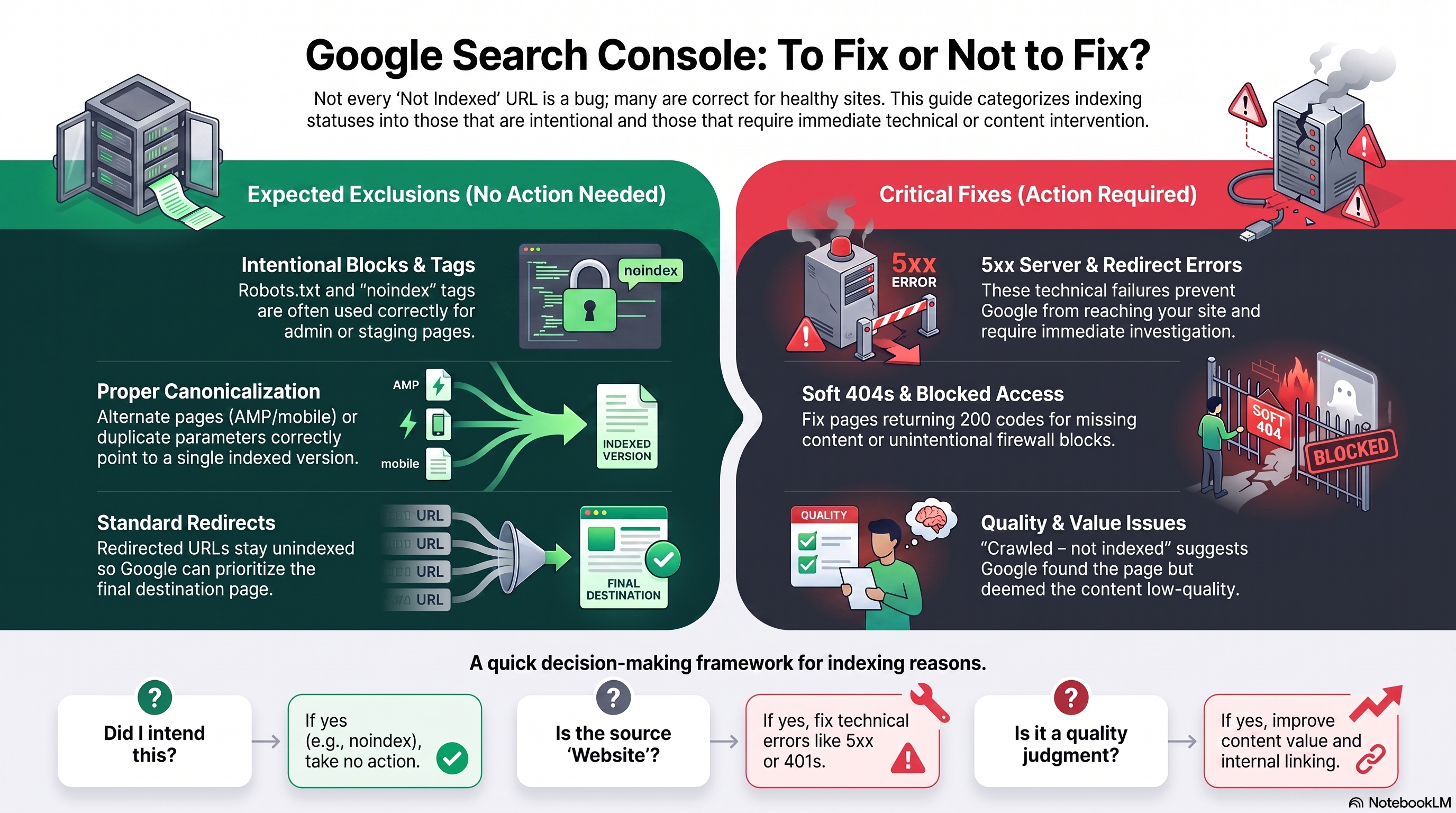
If you've opened the Page Indexing report in Search Console (Indexing > Pages) and seen a wall of gray "Not indexed" URLs, your first instinct is probably panic. Don't. Google is upfront about this: not being indexed is often the correct outcome, not a bug.
The trick is knowing which reasons are "nothing to do here" and which are genuinely costing you traffic. Below is every reason in the report, sorted by what you should actually do about it.
01 — Usually fine
These show up on every healthy site. Seeing them isn't a red flag.
You told Google not to crawl this page. If that's intentional — admin pages, filtered URLs, staging paths — leave it. Only act if you're blocking pages you actually want ranking.
Same logic as above. Only fix this if the tag was added by mistake — common after a CMS migration or a leftover "block everything" staging rule.
An AMP page or mobile variant correctly pointing to its indexed canonical. Nothing to do.
Google found this page is a copy of another and picked the canonical for you — correctly, in most cases. Normal for parameter variants like ?color=red or ?sort=price.
A non-canonical URL redirects elsewhere, so only the target gets indexed. Expected behavior for old URLs pointing to new ones.
Google indexed the page anyway because other sites link to it, despite your robots.txt block. If you truly want it excluded, robots.txt alone won't do it — remove the block and add a noindex tag instead.
02 — Judgment calls
Not wrong, not automatically fine either. Inspect before you act.
Inspect both URLs. If your declared canonical is genuinely a near-duplicate, Google's call is defensible — leave it, or make the pages more distinct. If Google's simply wrong, strengthen internal linking and canonical signals toward the page you actually want indexed.
Google knows the URL exists but hasn't crawled it — usually deprioritized for crawl budget, not blocked. If you care about this page, improve internal linking from higher-authority pages and confirm it's in your sitemap. Repeated resubmission won't speed this up.
The one that stings. Google visited and decided, on quality grounds, not to index it. Fix the content — add unique value, merge with a stronger page, improve E-E-A-T, or delete it. Resubmitting without changing anything rarely works.
03 — Fix these
Technical faults that almost always need action, source: website.
Your server failed to respond when Google crawled. Check Crawl Stats for host availability issues, fix timeouts or overload, and confirm with a live URL test.
A chain that's too long, a loop, or a broken link in the chain. Audit redirects and point old URLs directly at their final destination in one hop.
Looks like "not found" to Google but returns a 200 status. Return a genuine 404/410 if the page is gone, or add real content if it's meant to be live.
Googlebot was denied access by an auth requirement or firewall rule. If the page should be public, remove the login requirement or allow verified Googlebot through.
Only worth fixing if you link to it yourself or it's in your sitemap. Genuinely gone with no replacement? A 404 is correct. Moved? Add a 301.
Indexed, but Google couldn't read the content — often cloaking or an unsupported format. Check what Googlebot renders vs. what users see.
04 — The decision framework
Three questions, in order, for any reason you see in the report.
- Did I intend this? — noindex, robots.txt, canonical pointing elsewhere. If yes, no action.
- Is the Source "Website"? — If yes, it's fixable on your end. Prioritize server errors, redirects, and auth issues first, since these block indexing outright.
- Is Google making a quality judgment? — Crawled/Discovered – currently not indexed. No quick fix exists here; improve content, links, or authority, then let Google recrawl naturally.
05 — When to act, when to wait
Prioritize
- Pages you actually want ranking — not thin filter or parameter variants
- Source: Website, hard errors — 5xx, 401/403, redirect errors, soft 404s
- A spike in one issue type lining up with a drop in indexed pages — a real regression
Leave alone
- Intentional duplicates, filtered variants, admin/staging URLs
- "Crawled/Discovered – currently not indexed" before you've improved anything — resubmitting alone won't change Google's mind
- A small, expected set of exclusions while total indexed count keeps growing steadily