Once your frontend talks to a backend through an API, one question comes up immediately: how does the server know who is making each request? HTTP itself is stateless — every request arrives as a stranger. Authentication is the mechanism that lets a request prove “I'm the same user who logged in a minute ago.”
Three approaches dominate modern web development: server-side sessions with cookies, JSON Web Tokens (JWT), and OAuth 2.0 (often with OpenID Connect). They're frequently compared as if they were interchangeable, but they solve different problems. This guide explains how each works, where each fits, and the mistakes that most often turn a login system into a security hole.
1. Authentication vs Authorization
These two words get mixed up constantly, and the confusion causes real bugs:
- Authentication (AuthN) answers “Who are you?” — verifying identity with a password, a passkey, or a code.
- Authorization (AuthZ) answers “What are you allowed to do?” — checking whether this verified user may read this order or delete that post.
Sessions and JWTs are ways to carry proof of authentication between requests. Authorization checks still have to happen in your code on every request — and missing them is the number one API vulnerability, as we cover in our OWASP Top 10 guide for developers.
2. Session-Based Authentication
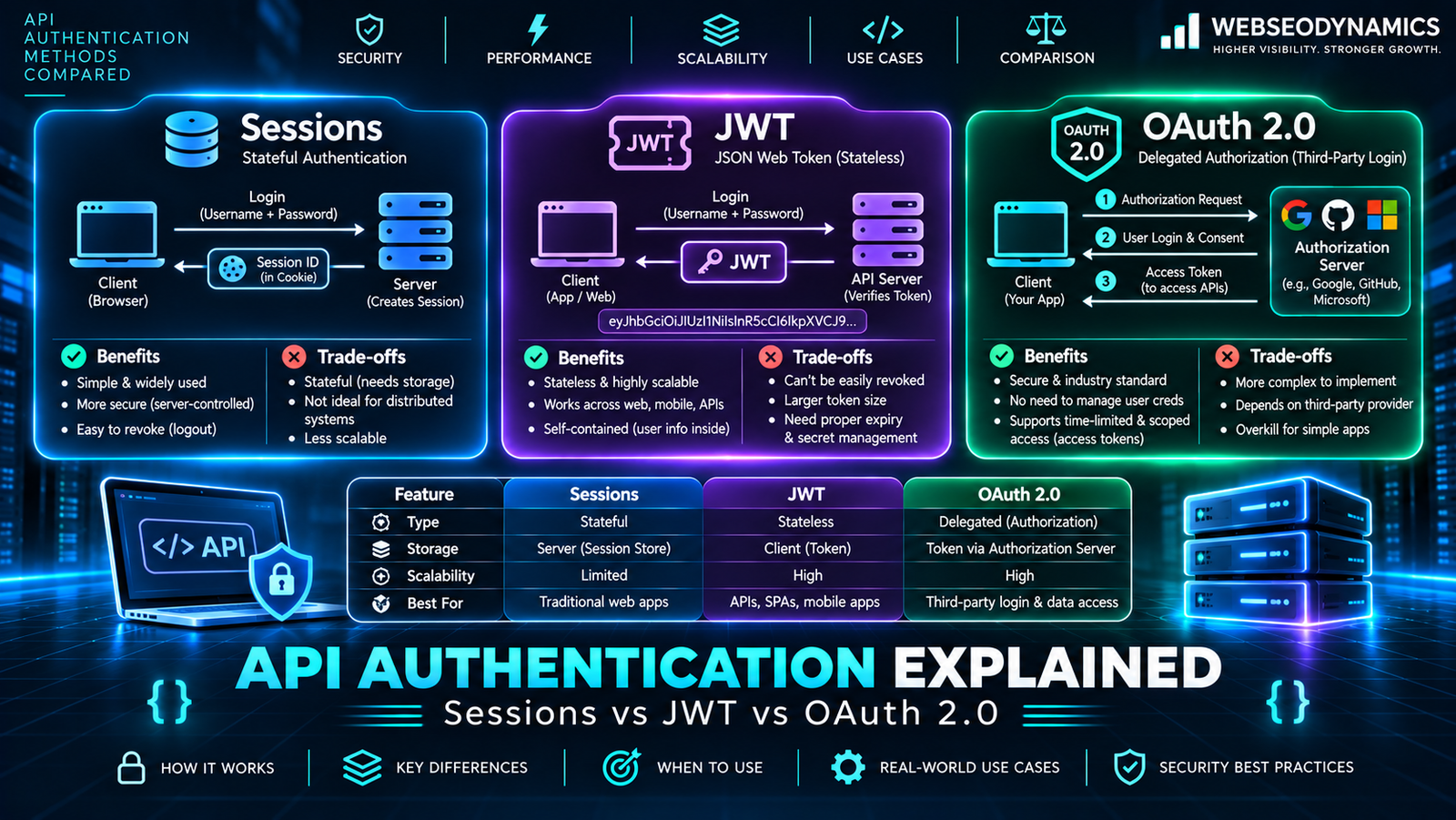
The classic approach, and still an excellent default for websites. After a successful login, the server creates a session record (in memory, files, a database, or Redis) and sends the browser a random session ID in a cookie. The browser automatically attaches that cookie to every later request, and the server looks up the session to find the user.
<?php
// login.php — secure session login in plain PHP
session_set_cookie_params([
    'lifetime' => 0,
    'path'     => '/',
    'secure'   => true,     // HTTPS only
    'httponly' => true,     // not readable by JavaScript
    'samesite' => 'Lax',    // basic CSRF protection
]);
session_start();

$user = findUserByEmail($_POST['email']);
if ($user && password_verify($_POST['password'], $user['password_hash'])) {
    session_regenerate_id(true);   // prevent session fixation
    $_SESSION['user_id'] = $user['id'];
}
Strengths
- Instant revocation: delete the session on the server and the user is logged out everywhere, immediately.
- Nothing sensitive in the browser: the cookie holds only a random ID.
- Built into every backend framework and very hard to get badly wrong.
Weaknesses
- The server must store and look up session state — with several servers, that means a shared store like Redis.
- Cookies work naturally for browsers on the same site, but are awkward for native mobile apps and third-party API clients.
- Because browsers send cookies automatically, you need CSRF protection (SameSite cookies plus CSRF tokens for state-changing forms).
3. JSON Web Tokens (JWT)
A JWT is a compact, signed token that carries claims about the user directly inside it. It has three Base64URL-encoded parts separated by dots: a header, a payload, and a signature.
// Decoded JWT payload
{
  "sub": "1042",            // user ID
  "role": "editor",
  "iat": 1763030400,        // issued at
  "exp": 1763031300         // expires 15 minutes later
}

// Sent with each API request
Authorization: Bearer eyJhbGciOiJIUzI1NiJ9.eyJzdWIiOiIxMDQyIn0.Xf3k...
The server verifies the signature with its secret or public key. If it's valid and not expired, the server trusts the claims without a database lookup. That's the big appeal: stateless authentication that any service holding the key can verify.
Important: A JWT is signed, not encrypted. Anyone holding the token can decode and read the payload. Never put passwords, personal details, or anything secret in it.
Strengths
- No shared session store needed — well suited to microservices and APIs consumed by mobile apps.
- Works across domains and with non-browser clients through the
Authorizationheader.
Weaknesses
- Hard to revoke: a stolen JWT stays valid until it expires. The standard answer is short-lived access tokens (5–15 minutes) plus a refresh token that is stored and revocable on the server — which reintroduces some state.
- Easy to misconfigure: accepting the
nonealgorithm, using weak signing secrets, or skipping expiry checks are well-known pitfalls. Use a maintained library and pin the expected algorithm. - Tokens are larger than a session ID and are sent on every request.
If your only client is your own website on the same domain, JWTs often add complexity without adding benefits. They earn their place when several independent services or non-browser clients need to verify identity.
4. OAuth 2.0 and OpenID Connect
OAuth 2.0 is a different kind of thing. It's an authorization framework that lets a user grant one application limited access to their data in another — for example, letting a scheduling app read your Google Calendar without ever seeing your Google password. OpenID Connect (OIDC) is a thin identity layer on top of OAuth 2.0 that adds login: it's what powers “Sign in with Google / Microsoft / Apple.”
The Authorization Code Flow with PKCE
For web and mobile apps, the recommended flow today is the Authorization Code flow with PKCE (Proof Key for Code Exchange). Simplified:
- Your app redirects the user to the identity provider with a one-time code challenge.
- The user logs in and approves the requested scopes (e.g., “read email address”).
- The provider redirects back with a short-lived authorization code.
- Your backend exchanges the code (plus the PKCE verifier) for tokens.
- Your app creates its own session or token for the user.
The older Implicit flow, which returned tokens directly in the browser URL, is no longer recommended. Note that OAuth doesn't replace sessions or JWTs inside your app — after the OAuth handshake, you still need one of them to remember the user on your own site.
5. Comparison Table
| Aspect | Sessions | JWT | OAuth 2.0 / OIDC |
|---|---|---|---|
| What it is | Server-stored login state | Self-contained signed token | Delegated access / third-party login protocol |
| Server state | Yes | No (except refresh tokens) | Depends on implementation |
| Revocation | Immediate | On expiry, unless you keep a denylist | Via the provider |
| Best for | Websites and same-domain web apps | Mobile apps, microservices, cross-domain APIs | Social login, SSO, third-party integrations |
6. Where to Store Tokens in the Browser
This is where many single-page apps go wrong. The two common options have opposite risks:
localStorage: convenient, but any JavaScript on the page can read it. A single cross-site scripting (XSS) bug — or a compromised third-party script — can steal every user's token.HttpOnlycookies: JavaScript can't read them, which blocks token theft via XSS. They need CSRF protection, whichSameSite=LaxorStricthandles for most cases.
For browser apps, the widely recommended pattern is to keep tokens out of JavaScript entirely: use HttpOnly, Secure, SameSite cookies, often through a small Backend-for-Frontend (BFF) that holds OAuth tokens server-side and gives the browser only a session cookie. If your API lives on another domain, you'll also need correctly configured CORS — explained in our guide to CORS and security headers.
7. Best Practices Checklist
- Serve everything over HTTPS — credentials and tokens must never travel in plain text.
- Hash passwords with a slow algorithm (
password_hash()in PHP uses bcrypt by default; Argon2id is also excellent). Never store plain or MD5/SHA1 passwords. - Regenerate the session ID on login and privilege changes.
- Keep JWT access tokens short-lived; rotate refresh tokens and revoke them on logout.
- Rate-limit login, password-reset, and OTP endpoints to slow down brute-force attacks.
- Offer multi-factor authentication or passkeys for accounts with valuable data.
- Check authorization on every request for every object, not just at login.
- Prefer a proven library or identity provider over writing crypto code yourself.
Want to see this in a real project? Our step-by-step tutorial on building a REST API with PHP puts token authentication into a working API.
8. Frequently Asked Questions
Are JWTs more secure than sessions?
No — they're different, not more secure. Sessions are easier to revoke and keep less data in the browser. JWTs are easier to verify across many services. Both are secure when implemented carefully and both are unsafe when stored or validated carelessly.
Is OAuth the same as “Login with Google”?
“Login with Google” uses OpenID Connect, which is built on OAuth 2.0. Plain OAuth 2.0 is about granting access to resources; OIDC adds a standard ID token that tells your app who the user is.
What should a small business website use?
Server-side sessions with secure cookies. Add social login through OIDC if your users would find it convenient, and only introduce JWTs if you later build a mobile app or separate services that need them.
Conclusion
Sessions, JWTs, and OAuth aren't rivals — they cover different layers. Sessions are the simplest, most revocable choice for websites. JWTs shine when many services or non-browser clients need to verify identity independently. OAuth and OpenID Connect handle delegated access and third-party login. Pick the simplest one that meets your real requirements, store credentials where JavaScript can't reach them, and never treat “logged in” as a substitute for checking what a user is allowed to do.
Need Secure Login for Your Web App?
At WebSeoDynamics, we build authentication that's secure by default — sessions, token-based APIs, and social login — without slowing your users down.
Get a Free Consultation Today