TL;DR
Google confirmed in March 2026 that it's testing full generative AI rewrites of title links in Search — not just truncation — so a title tag optimized for 2026 has to survive two filters: Google's rewrite engine and the reader's scroll. Six moves matter most:
- Mirror your H1 in your title tag — mismatch is the single biggest rewrite trigger.
- Stay in the 50–60 character range — the best-documented "leave it alone" zone.
- Skip brackets, go easy on pipes — colons and dashes survive Google's rewrite logic better.
- Write for the AI Overview citation, not just the blue link — a specific angle beats a generic label.
- Don't treat the title in isolation from Core Web Vitals — since March 2026, Google scores page experience holistically, and a weak score undercuts even a well-optimized title.
- Audit regularly — Google never tells you when it rewrites your title, so check manually.
Full sourcing and reasoning for each below, followed by platform-specific how-tos.
Why 2026 Is Different (the actual algorithm/feature changes behind this)
Before the tactics, here's what's actually changed and why it matters for title tags specifically:
- Google confirmed AI-generated headline rewrites on March 20, 2026. This isn't the old rule-based truncation system — it's generative AI drafting entirely new title links based on page content, query, and behavior signals, sometimes changing tone and meaning, not just length.[1]
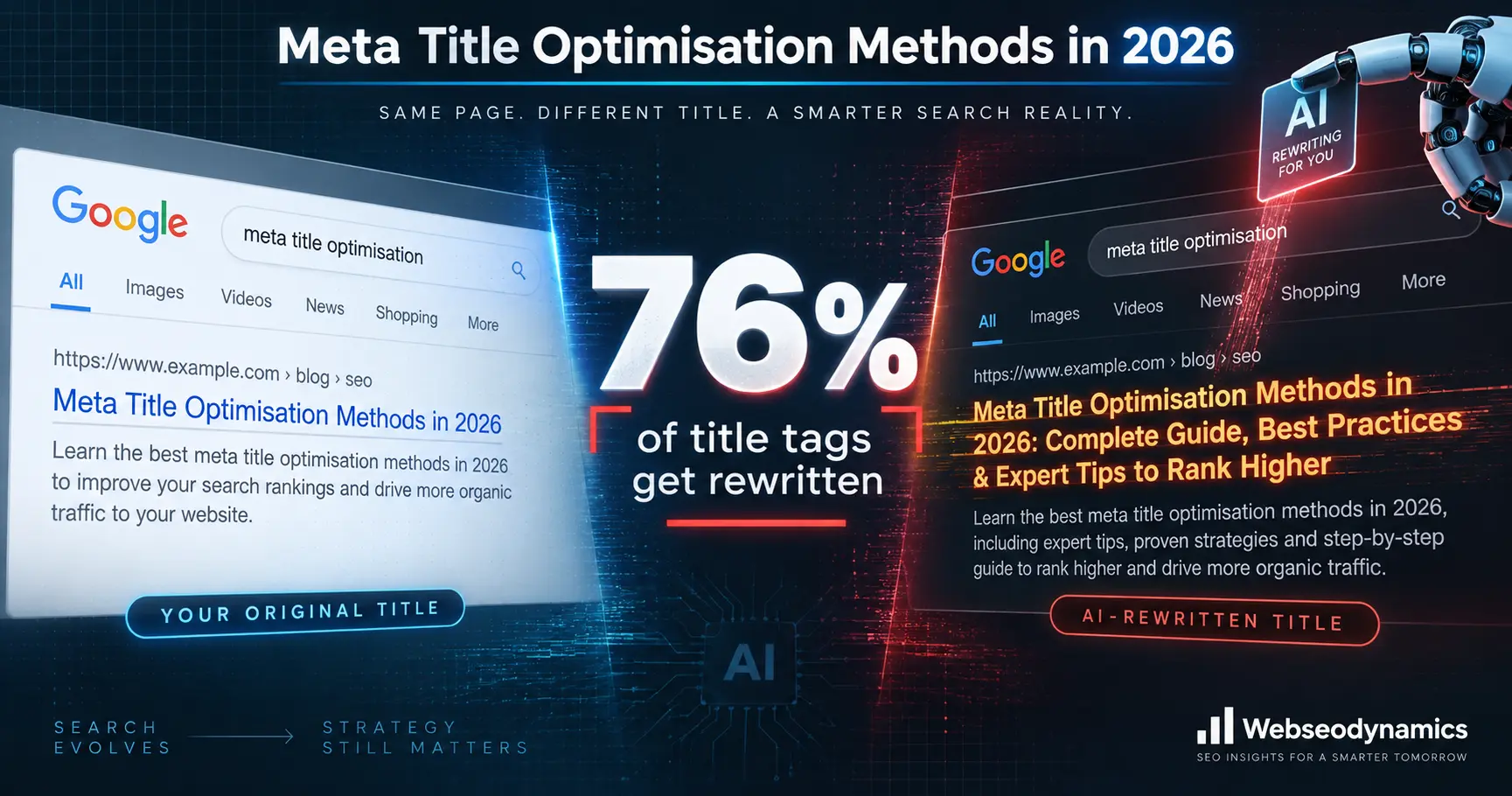
- The rewrite rate is already high and climbing. Google was rewriting roughly 76% of title tags via its rule-based system as of 2025; the new generative layer adds a further layer of unpredictability on top of that. [2]
- The March 2026 core update introduced holistic Core Web Vitals scoring — Google now aggregates LCP, INP, and CLS into one composite score instead of judging each metric in isolation, so a weak page-experience score can now suppress a page even when its content and title are strong. [3]
- AI Overviews now appear in roughly a quarter of Google searches (up from ~13% a year prior), and pages cited inside AI Overviews see meaningfully higher click-through than uncited pages — meaning your title now has two audiences: the classic SERP and the AI summary layer. [4]
- June and August 2026 spam updates expanded enforcement against scaled AI content abuse and expired-domain manipulation — a signal that titles/content perceived as templated or synthetic are increasingly risk factors, not just ranking non-events. [5]
Caveat on the stats above: the character-count, rewrite-rate, and trigger-pattern figures throughout this post come from independent SEO tool vendors and agencies analyzing SERP data at scale (Launchcodex, Wire, MetaGenius AI, etc.) — not from an official Google-published number. Google itself has never published exact rewrite-rate percentages. Treat these as directional, well-evidenced industry findings, and check the linked source before citing a specific figure as fact.
Optimization Techniques for 2026 (and the update/feature behind each one)
1. Match your title tag to your H1 and page intent exactly
Analysis of rewrite triggers shows that aligning the title tag with the page's H1 drops the rewrite rate from roughly 76% down to about 20%. Google's rewrite system reaches for the H1 or on-page heading when it thinks the <title> doesn't accurately represent the content — so intent-mismatch is the single biggest rewrite trigger. Do this: Write your H1 first, then derive the title tag from it rather than treating them as two separate creative exercises. [6]
2. Keep titles in the 50–60 character range
Titles in the 30–60 character range are least likely to be rewritten; titles over 60 characters get rewritten at rates above 95%, and 84% of unchanged titles studied fell in the 30–60 character band. Do this: Front-load the primary keyword/benefit in case of truncation, but don't chase length for length's sake — the sweet spot is about clarity, not just character count. [7]
3. Avoid brackets and be careful with pipes as separators
Brackets in titles (e.g., [Guide], [2026], [Updated]) trigger rewrites roughly 77.6% of the time in studied cases, and Google removes the bracketed portion entirely in about 32.9% of those. Pipe separators also correlate with a higher rewrite rate (around 41% in one German-market study) than colons or dashes. Do this: Use a colon or a simple dash to separate the topic from the brand, and reserve brackets only if the bracketed text is essential (rare). [8]
4. Write for the AI Overview citation, not just the blue link
Pages cited inside AI Overviews reportedly earn about 35% more organic clicks than non-cited pages, and Google's headline-rewrite AI evaluates page content plus query intent to draft a replacement — so a title that clearly signals unique depth or a specific answer (rather than a generic label) is more likely to survive both the classic SERP and get selected/cited by the AI layer. Do this: Avoid titles that just restate the topic ("What Is X?") — signal a specific angle or payoff the AI Overview would want to cite ("X: The 3 Numbers Most Guides Skip"). [9]
5. Treat page experience as a title-adjacent ranking factor
Since the March 2026 core update aggregates Core Web Vitals into one composite score, a technically excellent title on a slow, unstable page is now working against a bigger headwind than before — the two used to be evaluated more independently. Do this: Pair title optimization work with a Core Web Vitals check (PageSpeed Insights / Search Console) rather than treating them as separate projects. [10]
6. Audit for rewrites — don't assume your title is what's showing
Google doesn't notify you when it rewrites a title, so the only way to know is to check. Do this: Search site:yourdomain.com "target keyword" in an incognito window, or use Search Console / a crawler to compare your source <title> against the live SERP title. High-impression, low-CTR pages are the fastest wins to audit first. [11]
How to Implement Title Changes by Platform
A. Static HTML sites
- Open the page file (e.g.,
index.html) in your editor. - Locate the
<title>tag inside<head>...</head>. - Replace the text between
<title>and</title>with your new title. - Save, re-upload/deploy, then hard-refresh and use "View Page Source" to confirm the change is live.
- Repeat per page — there's no template, so each page's title must be edited individually.
B. PHP-templated / custom framework sites
- Find where the
<head>is rendered — usually a sharedheader.phporlayout.phpfile included on every page. - If titles are currently hardcoded, convert the
<title>tag to a variable, e.g.:<title><?phpecho $page_title; ?></title> - In each page/controller file, set
$page_titlebefore the header is included. - If using a routing/MVC framework (Laravel, CodeIgniter, etc.), set the title via the controller or a dedicated meta-data array passed to the view, rather than editing the layout each time.
- Clear any page cache/opcode cache after deploying so the new titles serve immediately.
C. WordPress — no SEO plugin
- WordPress generates titles from the theme via
wp_head()and thedocument_titlefilter (modern themes) or a hardcoded<title>tag inheader.php(older themes). - To customize per-page/post without a plugin, add this to your theme's
functions.php:add_filter('pre_get_document_title', function($title){ if (is_singular()) { $custom = get_post_meta(get_the_ID(), 'custom_seo_title', true); if ($custom) return $custom; } return $title; }); - Add a custom field named
custom_seo_titleon each post/page to set an override. - This is fragile at scale — it's the reason most sites move to Yoast or Rank Math once they pass a handful of pages.
D. WordPress + Yoast SEO (Free)
- Install/activate the Yoast SEO plugin from the WordPress plugin directory.
- Open any post or page editor; scroll to the Yoast SEO meta box below the content editor.
- Click the Search appearance tab inside the box.
- Edit the SEO title field — Yoast shows a live Google SERP preview and a length indicator (green when in range).
- For site-wide templates (archives, homepage, taxonomies), go to Yoast SEO → Settings → Search appearance and edit the title templates there using variables like
%%title%%,%%sitename%%,%%sep%%. - Save/update the post — the free version requires manual writing for every title.
E. WordPress + Yoast SEO Premium
- Everything in the Free workflow above still applies, plus:
- Inside the same Search appearance tab, click Generate with AI (or "Use AI") next to the SEO title field.
- Yoast's AI Generate feature drafts five SEO-optimized title options based on your actual post content; review each against the H1-alignment and length guidance above, then click Apply title, or Generate 5 more for additional options.
- Use the Bulk Editor (Yoast SEO → Tools → Bulk Editor, Premium) to review and rewrite titles across your whole site from one screen — useful for a fast audit pass after a Google rewrite check.
- As with any AI suggestion, edit for brand voice and factual accuracy before publishing — Yoast explicitly frames this as a first draft, not a final title.
F. WordPress + Rank Math (Free)
- Install/activate Rank Math SEO and complete the setup wizard.
- Open a post/page editor; the Rank Math meta box appears below the content (or in the sidebar in the block editor).
- Click the General tab and edit the SEO Title field — Rank Math shows a live SERP preview, character count, and a 0–100 content score that factors in title/length.
- For archive/taxonomy/homepage templates, go to Rank Math → Titles & Meta and edit each post-type/archive template using variables (
%title%,%sitename%,%sep%). - The free version covers unlimited sites and full manual title/meta editing — no AI generation, but no artificial cap on basic title customization either.
G. WordPress + Rank Math Pro
- Follow the Free workflow above for manual edits, plus:
- Enable Rank Math Content AI (separate credit-based module bundled with Pro) from the Rank Math dashion.
- Inside the post editor, use the Content AI panel to generate title suggestions informed by keyword and SERP analysis, not just on-page content.
- Use Rank Math Pro's keyword rank tracking (Rank Math → Analytics) to identify high-impression/low-CTR pages — the same pages Google's own guidance flags as the best titles to rewrite first.
- Apply/edit the AI suggestion in the SEO Title field as in the free workflow, then re-check the live SERP title after Google re-crawls.
H. Shopify
- In Shopify Admin, open the specific Product, Collection, or Page you want to edit.
- Scroll to the Search engine listing section at the bottom and click Edit website SEO (or the pencil/edit icon).
- Update the Page title field (keep it 50–60 characters; Shopify auto-appends your store name, so budget characters accordingly) and Meta description, then Save.
- For the homepage: go to Online Store → Preferences, scroll to Title and meta description, and edit there.
- If your entered title isn't appearing in the page source (view via right-click → View Page Source, check the
<title>tag), your theme is likely overriding the field. Go to Online Store → Themes → Edit code → layout/theme.liquid, and check the<title>block for hardcoded logic that ignorespage_title. - For bulk edits across a large catalog, use a CSV/bulk-editing app rather than editing pages one by one.
- Note: Shopify itself confirms Google may still rewrite the title you set, exactly as elsewhere — check View Page Source to confirm what you set, then search-test to confirm what Google shows.
One caveat worth stating plainly
None of the character-count or separator guidance above is a guarantee against a Google rewrite — Google has said the rewritten title is a display change, not a ranking signal change, and it still uses your original HTML <title> for ranking purposes even when it shows something different in the SERP. The goal of these techniques is to reduce the odds of an unwanted rewrite and to make sure that, rewritten or not, the underlying signal you're sending Google is accurate. [12]
References
- ^ DEV Community — "Google Is Rewriting Your Headlines With AI", Mar 22, 2026; also reported by Launchcodex, Apr 17, 2026.
- ^ Launchcodex, citing Q1 2025 title-rewrite research.
- ^ Digital Applied — "Google Algorithm Update History: Complete 2026 Timeline", Apr 7, 2026.
- ^ AI Overview appearance-rate figures (citing Ahrefs data) via DEV Community; click-through figure via Wire — "Title Tag Rewriting: When Google Ignores Your Title", Mar 10, 2026.
- ^ ALM Corp — "Google Algorithm Updates 2026", Jul 8, 2026; Found — "SEO & Google Algorithm Updates 2026", Aug 2026 (August 18 Spam Update rollout).
- ^ MetaGenius AI — "Shopify Meta Title Best Practices 2026", Jun 4, 2026, citing Cyrus Shepard's 80,000-title study and a 2025 follow-up analysis.
- ^ Launchcodex — "Google Confirms AI Headline Rewrites", Apr 17, 2026, citing Q1 2025 title-tag research.
- ^ Wire — "Title Tag Rewriting: When Google Ignores Your Title", Mar 10, 2026 (bracket data); SEO-Kreativ — "Google Tests AI-Generated Titles in Search Results", Mar 27, 2026 (pipe data).
- ^ Wire — "Title Tag Rewriting", Mar 10, 2026.
- ^ Digital Applied — "Google Algorithm Update History: Complete 2026 Timeline", Apr 7, 2026.
- ^ Launchcodex — "Google Confirms AI Headline Rewrites", Apr 17, 2026.
- ^ Pixis — "Do Title Tags & Meta Descriptions Drive Rankings?", Jun 22, 2026; Neil Patel — "Best Practices for Writing SEO Title Tags in 2026".