TL;DR
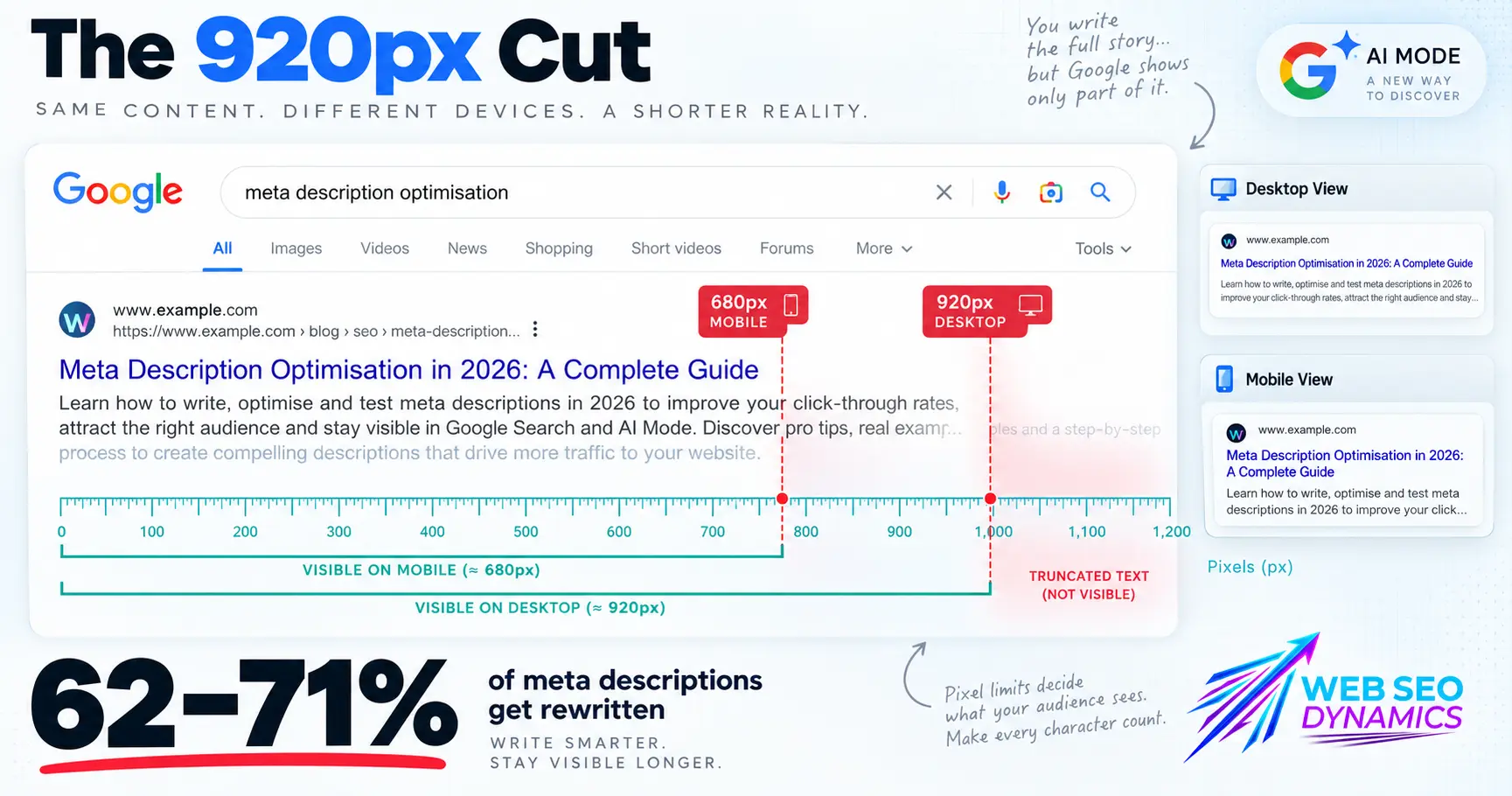
Google rewrites roughly 62–71% of meta descriptions, and the "160-character rule" is really a pixel-width limit in disguise. Seven moves matter most in 2026:
- Design for pixel width (≈920px desktop / 680px mobile), not a character count — wide letters eat the budget faster than narrow ones.
- Write to the specific query intent, not the general page topic — this alone raises Google's "keep it as-is" rate from ~30% to 55–60%.
- Eliminate the four classic rewrite triggers first — mismatched, missing, duplicated, or boilerplate descriptions.
- Front-load a self-contained, "citable" sentence — lead with the specific value, not a throat-clearing intro.
- Stop leaning on FAQ schema for extra SERP space — Google removed FAQ rich results on May 7, 2026, so that budget is better spent on the description itself.
- Write for a browser-level AI reader, not just the classic SERP — Chrome's own omnibox now routes some queries straight into AI Mode.
- Audit regularly — Google never flags a rewrite, so you have to check manually.
Full sourcing and reasoning for each below, followed by platform-specific how-tos.
Why 2026 Is Different (the actual features/updates behind this)
-
Google isn't counting characters — it's measuring pixels. The "160-character rule" is really a proxy for a pixel-width limit: roughly 920px on desktop and around 680px on mobile. Wide characters (W, M, D) eat that budget faster than narrow ones (i, l, t), which is why two 160-character descriptions can render very differently. [1]
-
Google rewrites meta descriptions for roughly 62–71% of results. Ahrefs' large-scale analysis of 30,000 queries found a 62.78% rewrite rate on desktop; Portent's independent analysis put it as high as 71%. The most common trigger, by far, is a description that doesn't match the query — Google substitutes text pulled directly from the page instead. [2]
-
Writing a query-aligned description measurably raises Google's "keep it as-is" rate. The same Ahrefs-cited analysis found that a specific, query-matched description raises the use-rate from roughly 30% (generic/templated descriptions) to 55–60%. That's the single highest-leverage lever available. [3]
-
Google removed FAQ rich results from Search on May 7, 2026, following the earlier 2023 deprecation of desktop HowTo rich results. This matters for description strategy because it closes off one of the SERP's few remaining ways to win extra visual space beyond the standard snippet — putting more pressure on the meta description itself to earn the click, rather than relying on FAQ accordions to pad out your listing. [4]
-
Chrome's own address bar is absorbing search queries into AI Mode. Chrome 143 (rolling out through 2026) integrated AI Mode directly into the omnibox and New Tab page, letting users get an AI-generated answer before a classic results page — with search-side and settings-side, Chrome 144 added multi-tab context and Chrome 145 expanded the address bar into a full AI prompt box. This is on top of AI Overviews already appearing in a large share of Google.com searches. Net effect: the classic blue-link snippet is competing for attention with AI summaries at both the search-results level and now the browser level, so a meta description has to work as a stand-alone, citable summary, not just a persuasive ad line. [5]
-
AI Overviews reward tight, extractable "citation blocks." Analysis of 36 million AI Overview responses found they average 157 words, with 99% staying under 328 words and two-thirds landing between 150–200 words — meaning AI Overviews favor content (and by extension, summaries) that state the answer in a compact, self-contained way rather than building up to it. [6]
Caveat on the stats above: as with any SERP-behavior research, these figures come from independent SEO tool vendors and agencies (Ahrefs, Portent, Averi, WildAndFreeTools) analyzing search results at scale — Google has never published an official rewrite-rate percentage or pixel limit. Treat them as well-evidenced industry findings and check the linked source before citing a specific number as fact.
Optimization Techniques for 2026 (and the update/feature behind each one)
1. Design for pixel width, not a character count
Since the practical limit is roughly 920px desktop / 680px mobile rather than a fixed character count, a description full of wide characters can get cut off well before 160 characters, while a narrow-character description can run longer and still display fully. Do this: Use a SERP pixel-preview tool (not just a character counter) before publishing, and keep your core message inside the first ~120 characters so it survives both mobile truncation and any pixel-width surprises. [7]
2. Write to the specific query intent, not the page topic in general
Because a query-matched description raises Google's use-rate from ~30% to 55–60%, the description's job isn't to summarize the page — it's to answer the specific searcher intent the page is meant to satisfy. Do this: Write a distinct description per primary keyword/intent cluster a page targets, rather than one generic summary reused across similar pages. [8]
3. Eliminate the four classic rewrite triggers
Ranked by frequency, Google most often rewrites descriptions that are: (1) mismatched to the query, (2) missing or too short, (3) duplicated across pages, or (4) generic boilerplate ("Welcome to our site..."). Do this: Audit your site for missing, duplicate, or boilerplate descriptions first — these are the highest-probability, lowest-effort fixes before you touch copywriting quality. [9]
4. Front-load a self-contained "citable" sentence
With AI Overviews favoring compact, extractable answers (average 157 words, two-thirds between 150–200 words per response), a meta description that opens with a complete, factual claim is more useful to both a human scanning the SERP and a system deciding what to summarize or cite. Do this: Make your first sentence a standalone value statement (what the page delivers, plus a specific detail — a number, a timeframe, a differentiator) rather than a throat-clearing lead-in like "In this article, we discuss…". [10]
5. Don't lean on FAQ schema to win extra SERP space anymore
Since Google removed FAQ rich results from Search on May 7, 2026, adding FAQ sections purely to gain the extra visual real estate of an accordion snippet no longer pays off the way it did. The Q&A content itself can still be useful for other platforms and for general clarity, but it's no longer a meta-description-adjacent CTR tactic on Google. Do this: Redirect the effort you were putting into FAQ-schema-for-SERP-space into writing a genuinely strong, query-matched meta description instead — that's now the more reliable lever. [11]
6. Write for a browser-level AI reader, not just the classic SERP
With AI Mode now built into the Chrome omnibox itself (rolling out across Chrome 143–145 through 2026), some queries may never reach a traditional results page at all — Chrome can route straight into an AI-generated answer. Your meta description is one of the clearest, most structured signals a page can offer about what it actually contains, which matters more, not less, as more of the summarization work moves off the results page entirely. Do this: Treat the meta description as your page's "elevator pitch to a machine" as much as to a human — accurate, specific, and free of marketing fluff that a summarization system would have no reason to preserve. [12]
7. Audit for rewrites — don't assume your description is what's showing
Just like title tags, Google doesn't notify you when it rewrites a meta description. Do this: Search site:yourdomain.com "target keyword" in an incognito window and compare against your source <meta name="description">. Prioritize high-impression, low-CTR pages first — those are your fastest wins. [13]
How to Implement Meta Description Changes by Platform
A. Static HTML sites
- Open the page file in your editor.
- Locate (or add, if missing) this line inside
<head>...</head>:<meta name="description" content="Your description here, 140–155 characters."> - Edit the
contentattribute directly. - Save, re-upload/deploy, then hard-refresh and use "View Page Source" to confirm the change is live.
- Repeat per page — there's no template, so each page's description must be edited individually.
B. PHP-templated / custom framework sites
- Find the shared header file (e.g.,
header.php,layout.php) where<head>is rendered. - Convert the hardcoded meta tag into a variable, e.g.:
<meta name="description" content="<?php echo htmlspecialchars($page_description); ?>"> - In each page/controller file, set
$page_descriptionbefore the header is included. - If using an MVC framework (Laravel, CodeIgniter, etc.), pass the description via the controller or a dedicated meta-data array to the view, rather than hardcoding per page.
- Clear any page cache/opcode cache after deploying so new descriptions serve immediately.
C. WordPress — no SEO plugin
- WordPress does not generate a meta description by default — you need to add the tag and a source for its content.
- Add this to your theme's
functions.phpto pull from a custom field, falling back to an excerpt:add_action('wp_head', function() { if (is_singular()) { $desc = get_post_meta(get_the_ID(), 'custom_meta_description', true); if (!$desc) $desc = wp_trim_words(get_the_excerpt(), 30); echo '<meta name="description" content="' . esc_attr($desc) . '">' . "\n"; } }); - Add a custom field named
custom_meta_descriptionon each post/page to set a specific override. - This is fragile and easy to duplicate across templated content at scale — the main reason most sites move to Yoast or Rank Math once past a handful of pages.
D. WordPress + Yoast SEO (Free)
- Install/activate the Yoast SEO plugin.
- Open any post or page editor; scroll to the Yoast SEO meta box below the content editor.
- Click the Search appearance tab inside the box.
- Edit the Meta description field — Yoast shows a live Google SERP preview and a length/color indicator.
- For archive, homepage, and taxonomy templates, go to Yoast SEO → Settings → Search appearance and edit the description templates using variables like
%%excerpt%%,%%sitename%%. - Save/update — the free version requires writing each description manually.
E. WordPress + Yoast SEO Premium
- Everything in the Free workflow above still applies, plus:
- Inside the same Search appearance tab, click Generate with AI next to the meta description field.
- Yoast's AI Generate feature drafts five description options based on the post's actual content; check each against the query-match and pixel-width guidance above, then Apply meta description, or Generate 5 more.
- Use the Bulk Editor (Yoast SEO → Tools → Bulk Editor, Premium) to review and fix descriptions site-wide from one screen — useful right after a rewrite audit.
- Edit every AI draft for accuracy and voice before publishing; Yoast frames these as a starting point, not a final version.
F. WordPress + Rank Math (Free)
- Install/activate Rank Math SEO and complete the setup wizard.
- Open a post/page editor; the Rank Math meta box appears below the content (or in the block editor sidebar).
- Click the General tab and edit the Meta Description field — Rank Math shows a live SERP preview, character count, and a content score that factors in whether a description exists and is well-formed.
- For archive/taxonomy/homepage templates, go to Rank Math → Titles & Meta and edit each template's description field using variables (
%excerpt%,%sitename%). - The free version covers unlimited sites and full manual description editing — no AI generation, but no cap on basic customization either.
G. WordPress + Rank Math Pro
- Follow the Free workflow above for manual edits, plus:
- Enable Rank Math Content AI (credit-based module bundled with Pro) from the Rank Math dashboard.
- Inside the post editor, use the Content AI panel to generate description suggestions informed by keyword/SERP analysis, not just the page's own content.
- Use Rank Math Pro's keyword rank tracking and analytics to find high-impression/low-CTR pages — the same pages worth prioritizing for a description rewrite.
- Apply/edit the AI suggestion in the Meta Description field as in the free workflow, then re-check the live SERP snippet after Google re-crawls.
H. Shopify
- In Shopify Admin, open the specific Product, Collection, or Page you want to edit.
- Scroll to the Search engine listing section at the bottom and click Edit website SEO (or the pencil icon).
- Update the Meta description field (aim for 140–155 characters; check the live preview Shopify shows), then Save.
- For the homepage: go to Online Store → Preferences, scroll to Title and meta description, and edit the description field there.
- If your entered description isn't appearing in the page source (right-click → View Page Source, check
<meta name="description">), your theme may be overriding the field — check Online Store → Themes → Edit code → layout/theme.liquid for hardcoded logic that ignorespage_description. - For bulk edits across a large catalog, use a CSV export/import or a bulk-editing app rather than editing pages one by one.
- As with title tags, Shopify itself notes Google may still rewrite the description you set — use View Page Source to confirm what you set, then a live search test to confirm what Google shows.
One caveat worth stating plainly
The meta description is not a direct Google ranking factor — Google has confirmed this repeatedly. Its value is entirely indirect: a well-matched, specific description raises click-through rate, and click-through is one of many signals that can influence a page's performance over time. None of the techniques above guarantee Google will use your exact text — but they meaningfully raise the odds, and they ensure that whatever does show, whether written by you or synthesized by Google, is built on an accurate foundation.
References
- ^ WildAndFreeTools — "Meta Description Length & Character Limit: The 2026 Definitive Guide", Mar 19, 2026; CharCount — "Meta Description Length 2026", Feb 22, 2026.
- ^ HowManyWords — "Meta Description Length: Optimal Character Count for SEO (2026)", May 21, 2026, citing Ahrefs' 30,000-query study and Portent's analysis.
- ^ HowManyWords, May 21, 2026.
- ^ Globerunner — "Structured Data in 2026: The Schema Markup AI Actually Uses", Jul 2, 2026.
- ^ Chrome Enterprise release notes — Chrome 143 AI Mode integration, 2026; 9to5Google — "Google brings full AI Mode prompt box to Chrome address bar", Feb 21, 2026.
- ^ Averi.ai — "How to Get Featured in Google AI Overviews (2026 Playbook)", Apr 9, 2026.
- ^ WildAndFreeTools, Mar 19, 2026.
- ^ HowManyWords, May 21, 2026.
- ^ HowManyWords, May 21, 2026.
- ^ Averi.ai, Apr 9, 2026.
- ^ Globerunner, Jul 2, 2026.
- ^ Chrome Enterprise release notes, 2026; 9to5Google, Feb 21, 2026.
- ^ HowManyWords, May 21, 2026.