TL;DR
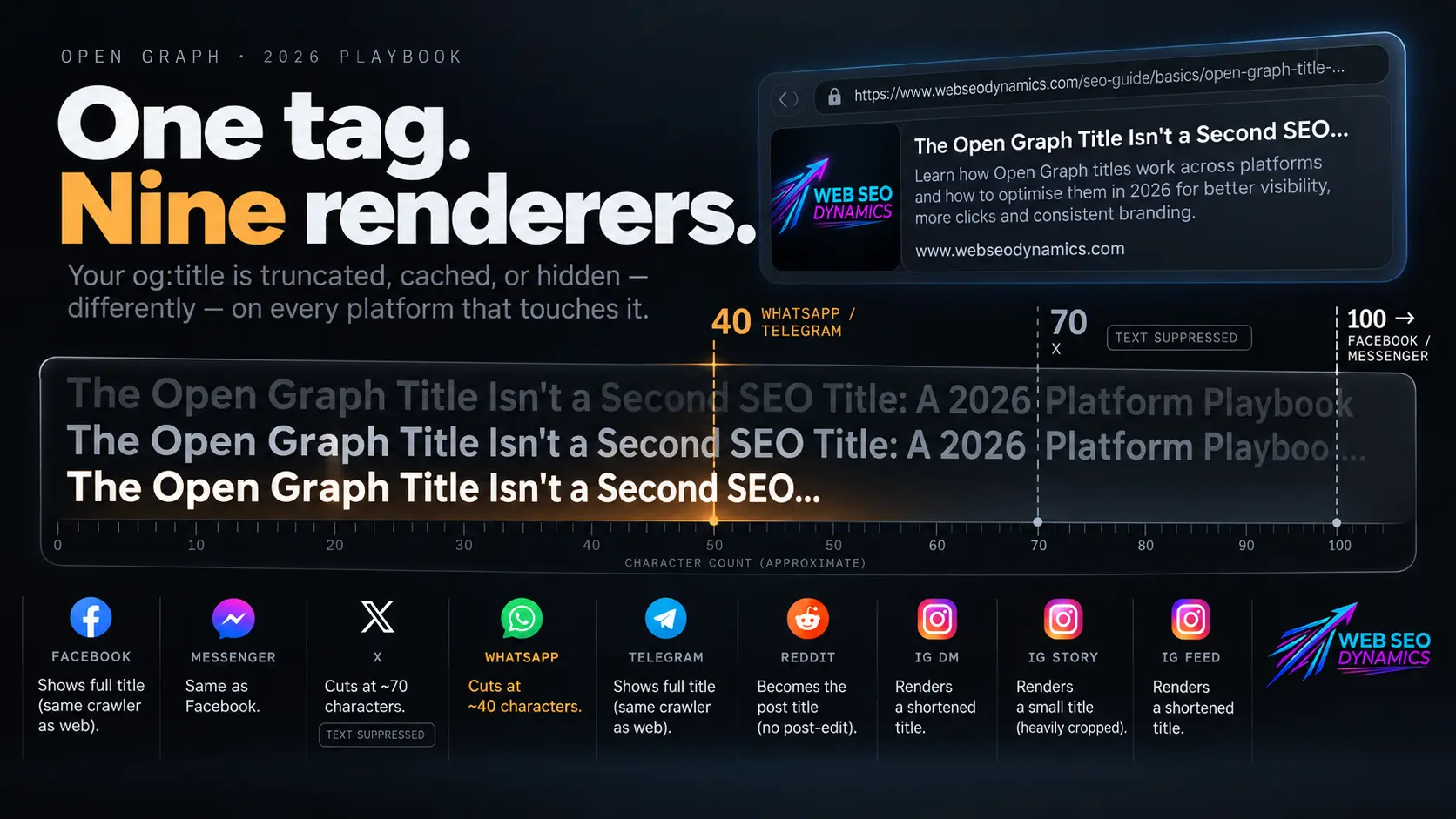
og:title isn't one tag with one behavior — it's one tag interpreted by roughly nine different systems, several of which changed how they handle it recently. Eight moves matter most in 2026:
- Write og:title separately from your
<title>— one is for Google, the other is for a person scrolling a feed. - Don't rely on X to display your title text at all — bake the headline into the og:image itself.
- Get the tag right before you publish, not after — Facebook removed the ability to manually edit organic post thumbnails, so there's no fixing it post-hoc.
- Front-load your title within ~40 characters — WhatsApp's display window is the tightest ceiling across every platform.
- Version your image/title URLs when you update them — WhatsApp and Telegram cache aggressively with no official public purge tool.
- Optimize for the surface, not just the platform — Instagram feed captions never render a preview at all; only DMs, Stories, and broadcast channels do.
- Write it like a real headline for Reddit — og:title becomes the actual suggested post title when someone submits your link.
- Validate on the live URL before every push — X retired its public Card Validator in 2022; use Facebook's Sharing Debugger and a third-party OG checker as your standard pre-flight check.
Full sourcing and reasoning for each below, followed by platform-specific how-tos.
Why 2026 Is Different (the actual platform/feature changes behind this)
-
Facebook removed the ability to manually edit link preview thumbnails on organic Page posts, specifically to fight misinformation and clickbait — a change that shifts all the weight back onto your source page's
og:image/og:titleaccuracy, since you can no longer swap in a better thumbnail at publish time the way you still can for paid ads. Source: Muffin Group — "How to Fix the Facebook Link Thumbnail Not Working Error", Mar 16, 2026. -
X has suppressed on-card title text since October 2023, on and off, and the pattern has held into 2026. X removed headlines from link previews for "aesthetics," briefly restored a tiny-text version in January 2024, then pulled it again within a day. As of 2026, title/description text on X link cards remains inconsistent, and the platform still has no restored public Card Validator (deprecated in 2022). Source: Social Media Today — "X's Updated Link Preview Format Is Now Live", Oct 2023; 9to5Google — headline reinstatement/removal, Jan 2024; OpenGraphDebug — "X/Twitter Open Graph Debugger", Jan 25, 2026.
-
Instagram does not render link previews in feed captions at all — this is a deliberate product decision, not a bug or a tag issue. OG previews only render in DMs, Story link stickers, and broadcast channels. A limited exception began testing in March 2026: Meta Verified professional accounts got a capped (~10 links/month) ability to post clickable in-feed links. Source: Share Preview — "Instagram Link Preview: Why It Looks Different", Feb 23, 2026; link.boo — "Instagram link preview not showing: the 2026 fix guide", Jun 1, 2026.
-
WhatsApp reads only three properties —
og:title,og:description,og:image— and ignores extended OG properties entirely. It has no official debugging or cache-purge tool, and it rejects GIF and SVG images outright, unlike Facebook, which still accepts both. Source: OGRilla — "WhatsApp Link Preview Requirements 2026", Jan 15, 2026; WildAndFreeTools — "WhatsApp Link Preview Wrong Image", Mar 29, 2026. -
Telegram also caches aggressively with no public clear-cache tool — the only reliable refresh method is appending a dummy query parameter (e.g.
?v=2) so Telegram treats the link as new and re-fetches it. Source: TryUnfurl — "Fix Telegram Link Preview", Apr 14, 2026. -
Character ceilings genuinely differ by platform, not by convention. Facebook allows OG titles up to roughly 100 characters before truncation; X displays around 70; WhatsApp shows only around 40 before an ellipsis cuts it off. There's no single "safe" number that works everywhere — WhatsApp is the real constraint. Source: The Interactive Studio — "Open Graph Meta Tags: Guide to og:image, og:url and og:type (2026)", Mar 6, 2026.
-
Reddit uses
og:titleas the suggested title when a link is submitted as a post — meaning your tag isn't just a preview label there, it's effectively pre-writing the headline a stranger will post to a subreddit on your behalf (editable, but most posters keep the default). Source: Threadify — "Reddit Preview Tool"; PainOnSocial — "Reddit Thumbnail Selection", Oct 30, 2025.
Caveat on the stats above: platform behavior for link previews is not documented in one official, consistently updated place — Facebook publishes some specs via its developer docs, but X, WhatsApp, Telegram, and Instagram's OG-consumption rules are mostly reverse-engineered by third-party tool vendors and documented through observed behavior. Treat the specific numbers as well-evidenced but unofficial, and re-verify with a live debugger before a high-stakes campaign, since these platforms change rendering behavior without announcement.
Optimization Techniques for 2026 (and the platform change behind each one)
1. Write og:title as a separate, human-facing tag — not a copy of your <title>
Your HTML <title> is written for Google's ranking and SERP display; og:title is read by a person mid-scroll on a feed. The two audiences want different things — keyword clarity vs. an emotional or curiosity hook. Do this: Draft them separately. Keep the SEO title keyword-forward; make the OG title benefit- or curiosity-forward, and skip repeating the brand name in the title itself (use og:site_name for that instead). Source: Magic Logix — "Mastering Open Graph Protocol SEO in 2026", Mar 30, 2026.
2. Design the og:image to carry the headline for X
Because X has intermittently and, since October 2023, mostly suppressed on-card title text, your og:title may simply not render as visible text there. The only reliable way to communicate a headline on X is to put it inside the image itself. Do this: For pages you expect to circulate heavily on X, design a dedicated og:image (or twitter:image) with the headline overlaid as text in the image, rather than trusting the title tag to display. Source: Social Media Today, Oct 2023; OpenGraphDebug, Jan 25, 2026.
3. Get the Meta-ecosystem tags right before publishing — there's no fixing it after
Since Facebook removed manual thumbnail editing on organic Page posts, and Messenger and Instagram DMs use the same facebookexternalhit crawler and cache as Facebook, an inaccurate or missing og:title/og:image at publish time now propagates across all three surfaces with no manual override available (outside of paid ads). Do this: Treat pre-publish OG validation as non-negotiable for any page you expect to be shared on Facebook, Messenger, or Instagram — there's no "fix it in post" step anymore. Source: Muffin Group, Mar 16, 2026.
4. Front-load your title within roughly 40 characters
WhatsApp displays only about 40 characters of og:title before truncating with an ellipsis — the tightest limit of any major platform (versus ~70 on X and ~100 on Facebook). Do this: Put the essential words — the specific value or topic — in the first 40 characters of every og:title, and treat anything beyond that as a bonus that only some platforms will show. Source: The Interactive Studio, Mar 6, 2026.
5. Version your image and title URLs when you update content
WhatsApp and Telegram both cache link previews aggressively and provide no official public tool to force a refresh. Do this: When you meaningfully change a page's title or image, append a version query string to the shared URL (e.g., ?v=2 or ?v=20260821) so these platforms treat it as a new link and re-crawl it, rather than serving the stale cached card. Source: WildAndFreeTools, Mar 29, 2026; TryUnfurl, Apr 14, 2026.
6. Optimize og:title for the surface it will actually render on
Instagram never renders link previews inside feed captions — by design, not by tag error. Your og:title only ever displays inside DMs, Story link stickers, and broadcast channels (plus, cautiously, the new March 2026 capped in-feed link test for Meta Verified accounts). Do this: Stop trying to "fix" a missing Instagram feed-caption preview — it's not fixable. Direct your OG optimization effort at the surfaces that do render it: DM shares, Story links, and broadcast channels. Source: Share Preview, Feb 23, 2026; link.boo, Jun 1, 2026.
7. Write og:title like an actual Reddit post headline
Reddit pulls og:title in as the pre-filled, suggested title when someone submits your URL as a link post — many posters just accept the default rather than rewriting it. Do this: For pages you expect to be shared on Reddit, write og:title the way you'd write a real Reddit post title: specific, non-clickbait, and free of marketing language that gets a post removed by subreddit moderators. Source: Threadify; PainOnSocial, Oct 30, 2025.
8. Validate on the live URL before every major link push
X deprecated its public Card Validator preview in 2022 and has never restored it, and no platform notifies you when it's serving a stale cached preview. Do this: Before a significant campaign or share, run the live URL through Facebook's Sharing Debugger (still functional and covers the Facebook/Messenger/Instagram crawler) plus a third-party OG checker that also simulates X, WhatsApp, and Telegram rendering — don't assume the tags are correct just because they look right in your HTML. Source: SocialRails — "Facebook Sharing Debugger: How to Fix Link Preview Issues", Jun 2026; OpenGraphDebug, Jan 25, 2026.
How to Implement og:title Changes by Platform
A. Static HTML sites
- Open the page file in your editor.
- Add (or edit) these lines inside
<head>...</head>:<meta property="og:title" content="Your Page Title (~40-60 chars ideal)"> <meta property="og:description" content="A one-sentence summary."> <meta property="og:image" content="https://yoursite.com/images/og-image.jpg"> <meta property="og:url" content="https://yoursite.com/your-page/"> <meta property="og:type" content="article"> - Save, re-upload/deploy, then use a live OG debugger (not just View Page Source) to confirm the tags are being read correctly.
- Repeat per page — there's no template, so each page's OG tags must be set individually.
B. PHP-templated / custom framework sites
- Find the shared header file (e.g.,
header.php,layout.php) where<head>is rendered. - Convert hardcoded OG tags into variables, e.g.:
<meta property="og:title" content="<?php echo htmlspecialchars($og_title); ?>"> <meta property="og:description" content="<?php echo htmlspecialchars($og_description); ?>"> <meta property="og:image" content="<?php echo htmlspecialchars($og_image); ?>"> - In each page/controller file, set
$og_title,$og_description, and$og_imagebefore the header is included — and rememberog:titlecan (and often should) differ from your<title>variable per technique #1 above. - If using an MVC framework (Laravel, CodeIgniter, etc.), pass OG values via the controller or a dedicated meta-data array to the view.
- Clear any page cache/opcode cache after deploying, then version the URL (
?v=2) the first time you re-share on WhatsApp/Telegram to bypass their caches.
C. WordPress — no SEO plugin
- WordPress does not add Open Graph tags by default.
- Add this to your theme's
functions.phpto output basic OG tags:add_action('wp_head', function() { if (is_singular()) { $og_title = get_post_meta(get_the_ID(), 'custom_og_title', true) ?: get_the_title(); $og_image = get_the_post_thumbnail_url(get_the_ID(), 'large'); echo '<meta property="og:title" content="' . esc_attr($og_title) . '">' . "\n"; echo '<meta property="og:description" content="' . esc_attr(wp_trim_words(get_the_excerpt(), 30)) . '">' . "\n"; if ($og_image) echo '<meta property="og:image" content="' . esc_url($og_image) . '">' . "\n"; echo '<meta property="og:url" content="' . esc_url(get_permalink()) . '">' . "\n"; } }); - Add a custom field named
custom_og_titleon any post/page where you want the OG title to differ from the post title. - This is fragile at scale and doesn't handle platform-specific fallbacks (Twitter Cards, etc.) — the main reason most sites move to Yoast or Rank Math past a handful of pages.
D. WordPress + Yoast SEO (Free)
- Install/activate Yoast SEO.
- Open any post or page editor; scroll to the Yoast SEO meta box.
- Click the Social tab (sometimes under "Social media appearance").
- Under the Facebook sub-tab, upload/select a specific Social image, and edit the Social title and Social description fields — this is your
og:title/og:image/og:description, distinct from the SEO title. - Yoast automatically outputs these as proper Open Graph tags site-wide once Yoast SEO → Settings → Site features → Social sharing is enabled.
- Save/update — repeat manually per important page.
E. WordPress + Yoast SEO Premium
- Everything in the Free workflow above still applies, plus:
- Yoast Premium's AI Generate feature (in the same Search/Social appearance panel) can draft title and description options — apply one as a starting point, then edit specifically for the OG/social framing (curiosity-driven, not keyword-driven) per technique #1.
- Use the Social Preview tool inside the editor to check how the card renders before publishing — check it specifically for Facebook's now-fixed (non-editable-after-publish) thumbnail behavior, since Premium won't let you fix a bad thumbnail post-publish either, only Facebook's own systems changed, not Yoast's.
- Use the Bulk Editor to audit OG/social titles across the whole site in one pass.
F. WordPress + Rank Math (Free)
- Install/activate Rank Math and complete setup.
- Open a post/page editor; open the Rank Math meta box (or sidebar panel).
- Click the Social tab.
- Toggle "Use title and description from the Post/SEO tab" off if you want a distinct OG title (per technique #1), then fill in Facebook Title, Facebook Description, and upload a Facebook Image — Rank Math maps these to
og:title,og:description, andog:image. - Rank Math also lets you separately customize the Twitter/X card fields on the same tab — use this to set an explicit
twitter:title/twitter:imagerather than relying on the OG fallback, given X's inconsistent title rendering.
G. WordPress + Rank Math Pro
- Follow the Free workflow above for manual edits, plus:
- Use Rank Math Content AI to generate social title/description variants, then hand-edit for the curiosity/benefit framing that performs better on social than a keyword-forward title.
- Use Rank Math Pro's analytics to see which shared pages are underperforming on click-through from social referral traffic (Google Analytics integration), and prioritize an OG audit for those pages first.
- Re-check the live card with a third-party debugger after any change — Rank Math generates the tags correctly, but platform caching still applies regardless of plugin.
H. Shopify
- Shopify auto-generates basic OG tags from your product/page title and description, but you can override them for stronger social framing.
- For theme-wide control: go to Online Store → Themes → Edit code → layout/theme.liquid, and locate (or add) the OG block inside
<head>:<metaproperty="og:title"content="{{ page_title }}"> <metaproperty="og:description"content="{{ page_description | default: shop.description }}"> <metaproperty="og:image"content="http:{{ page_image | image_url: width: 1200 }}"> <metaproperty="og:url"content="{{ canonical_url }}"> - For per-page overrides, use the Search engine listing field (Page title/Meta description) on each Product, Collection, or Page — most Dawn-based themes pull
page_titleandpage_descriptionfrom these fields into the OG tags automatically. - If you need an OG title genuinely different from your SEO title (per technique #1), you'll need a metafield: create a custom metafield (e.g.,
custom.og_title) via Settings → Custom data, then reference it intheme.liquid:<metaproperty="og:title"content="{{ product.metafields.custom.og_title | default: page_title }}"> - For bulk changes across a large catalog, use a CSV export/import or a dedicated social-meta app rather than editing
theme.liquidper product. - After any change, force a refresh on Facebook via the Sharing Debugger, and version the URL (
?v=2) if resharing soon on WhatsApp or Telegram.
One caveat worth stating plainly
None of this is a ranking factor for Google — Open Graph tags exist entirely for social and messaging platforms, not search. Their value is 100% about how your link looks and performs when a human shares it somewhere other than a search results page. Get the tags technically correct, but don't confuse OG optimization with SEO — they're solving two different problems that happen to live in the same <head> tag.