Core Web Vitals Optimization Guide: Improving LCP, INP, and CLS
Core Web Vitals are Google's attempt to quantify something that used to be purely subjective: whether a webpage actually feels fast and stable to a real person using it. Rather than measuring abstract server metrics, Core Web Vitals measure the moments users actually notice — how long before they see meaningful content, how quickly the page responds when they tap or click something, and whether elements jump around unexpectedly while they're trying to read or interact.
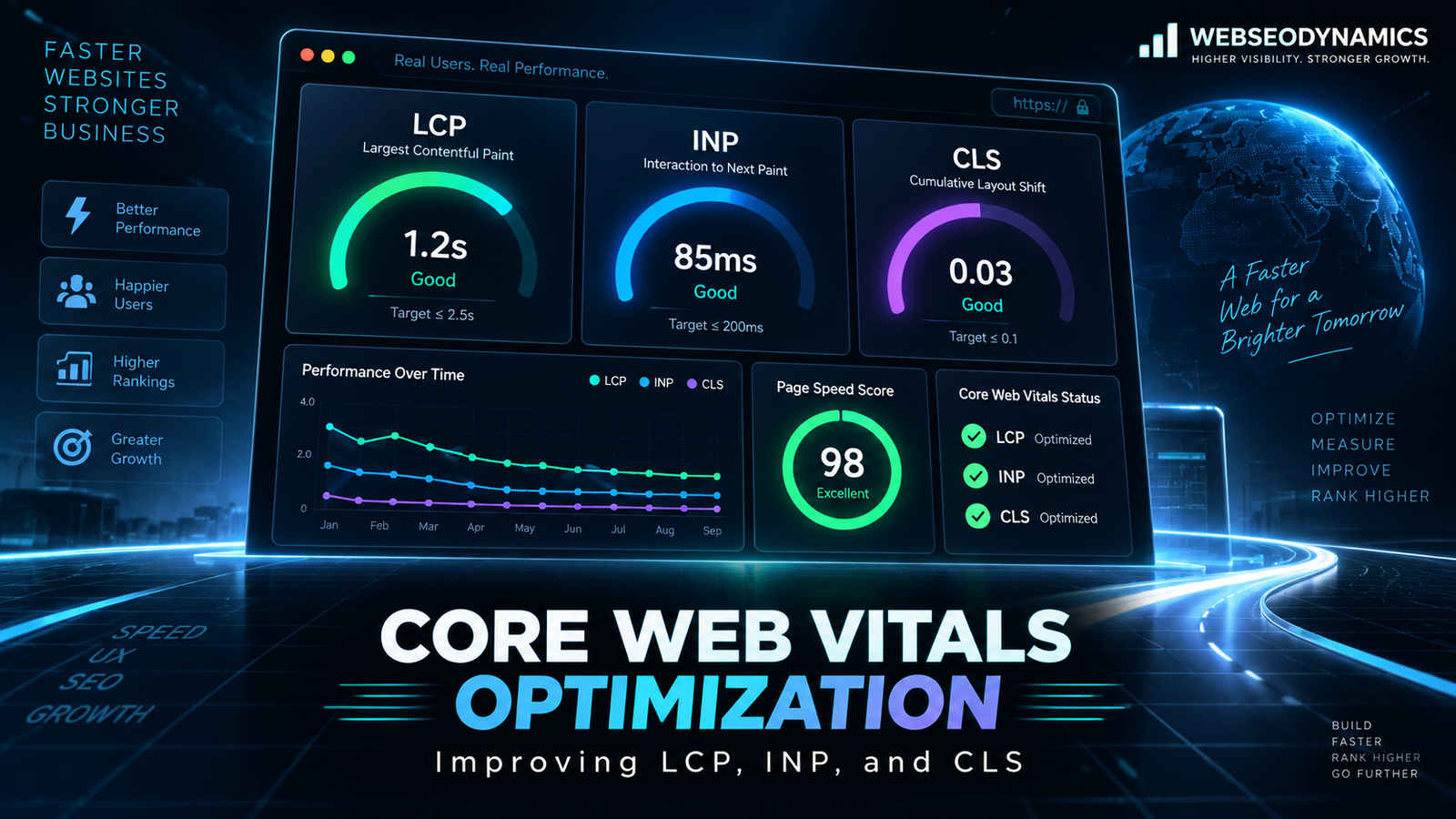
There are three current Core Web Vitals: Largest Contentful Paint (LCP), Interaction to Next Paint (INP), and Cumulative Layout Shift (CLS). Each measures a different dimension of user experience — loading, responsiveness, and visual stability — and each has its own specific set of causes and fixes. This guide walks through what each metric actually measures, the thresholds Google uses to judge "good" from "poor," and concrete techniques to improve each one.
1. Core Web Vitals at a Glance
Each Core Web Vital is scored against three bands: good, needs improvement, and poor. Google evaluates sites at the 75th percentile of page loads — meaning at least 75% of your real user visits need to hit the "good" threshold for the metric to count as passing overall, not just your average or best-case load.
LCP
Measures loading speed
Good: ≤ 2.5s
Poor: > 4s
INP
Measures responsiveness
Good: ≤ 200ms
Poor: > 500ms
CLS
Measures visual stability
Good: ≤ 0.1
Poor: > 0.25
It's worth noting that INP replaced First Input Delay (FID) as the official Core Web Vital for responsiveness. FID only measured the delay before the browser could begin processing the very first user interaction, which missed a lot of real responsiveness problems that happen later in a session. INP measures the full latency of every interaction throughout the page's lifecycle, giving a far more complete picture of how a page actually feels to use.
2. Largest Contentful Paint (LCP)
LCP measures the time from when a page starts loading to when the largest visible content element — typically a hero image, a large block of text, or a background image — finishes rendering within the viewport. It's meant to approximate the moment a user feels like "the page has actually loaded," rather than a technical milestone like the first byte or the DOMContentLoaded event, which don't necessarily correlate with what the user perceives.
Common Causes of Poor LCP
- Slow server response times (high Time to First Byte)
- Render-blocking CSS and JavaScript that delay the browser from painting anything
- Large, unoptimized images or videos used as the hero element
- Client-side rendering that requires JavaScript to execute before content appears at all
- Fonts that block text rendering until they finish downloading
How to Improve LCP
- Optimize and correctly size images: Compress images, serve modern formats like WebP or AVIF, and use `srcset` so browsers download an appropriately sized version rather than a single oversized file for every screen.
- Preload the LCP element: If you know which image or font is responsible for your LCP, add `<link rel="preload">` for it so the browser fetches it earlier rather than discovering it late in the parsing process.
- Eliminate render-blocking resources: Inline critical CSS needed for above-the-fold content, and defer non-critical CSS and JavaScript so they don't hold up the initial render.
- Improve server response time: Use a CDN, enable server-side caching, and choose hosting with adequate resources for your traffic — a fast frontend can't compensate for a slow server.
- Avoid client-side rendering for critical content: Server-side rendering or static generation delivers meaningful content in the initial HTML response, rather than requiring JavaScript to fetch and render it after the fact.
<!-- Preload the hero image responsible for LCP -->
<link rel="preload" as="image" href="/hero.webp" fetchpriority="high">

<!-- Responsive images so mobile doesn't download a desktop-sized file -->
<img
  src="/hero-800.webp"
  srcset="/hero-800.webp 800w, /hero-1600.webp 1600w"
  sizes="(max-width: 768px) 100vw, 1200px"
  alt="Product dashboard preview"
  width="1200" height="600"
>
3. Interaction to Next Paint (INP)
INP measures how quickly a page visually responds after a user interacts with it — clicking a button, tapping a menu, typing into a field. Specifically, it captures the full duration from the interaction to the next time the browser paints an update to the screen, across every interaction on the page, and reports a representative worst-case value.
Common Causes of Poor INP
- Long-running JavaScript tasks that block the browser's main thread
- Heavy event handlers doing expensive work synchronously on every click or keystroke
- Large DOM sizes that make style recalculation and re-rendering slower
- Third-party scripts (ads, analytics, chat widgets) consuming main-thread time
- Unnecessary re-renders in JavaScript frameworks triggered by inefficient state updates
How to Improve INP
- Break up long tasks: Split expensive JavaScript work into smaller chunks using techniques like `scheduler.yield()` or setTimeout-based chunking, so the main thread can respond to user input between chunks instead of blocking entirely.
- Debounce or throttle expensive handlers: For interactions like typing in a search box, avoid running expensive logic on every single keystroke — debounce it to run after the user pauses.
- Audit and trim third-party scripts: Every embedded widget or tracking script adds main-thread cost. Load non-essential third-party scripts with `async` or `defer`, and remove ones that aren't earning their performance cost.
- Reduce unnecessary re-renders: In frameworks like React, memoize expensive components and avoid triggering full re-renders for state changes that only affect a small part of the UI.
- Keep the DOM lean: A smaller, flatter DOM tree means less work for the browser every time something needs to be recalculated or repainted.
// Debouncing an expensive search handler
function debounce(fn, delay) {
  let timer;
  return (...args) => {
    clearTimeout(timer);
    timer = setTimeout(() => fn(...args), delay);
  };
}

searchInput.addEventListener(
  "input",
  debounce((e) => runExpensiveSearch(e.target.value), 300)
);
4. Cumulative Layout Shift (CLS)
CLS measures unexpected movement of visible elements on the page — the frustrating experience of trying to tap a button just as an ad loads above it and pushes it further down the screen. It's calculated as a score combining how much of the viewport shifted and how far elements moved, summed across the page's lifespan.
Common Causes of Poor CLS
- Images and videos without explicit width and height attributes, causing the browser to collapse space until they load
- Ads, embeds, and iframes injected without reserved space
- Web fonts that swap in with different metrics than the fallback font, shifting surrounding text (a "flash of unstyled text" variant)
- Dynamically injected content (banners, cookie notices) that pushes existing content down after the initial render
- Animations that use properties like `top`, `left`, `width`, or `height` instead of `transform`
How to Improve CLS
- Always set width and height on images and videos: This lets the browser calculate and reserve the correct aspect ratio before the asset loads, even if you don't know the exact final rendered size.
- Reserve space for ads and embeds: Set a minimum height on ad containers and iframe wrappers so the layout doesn't need to shift once the content actually loads.
- Use `font-display: optional` or match fallback font metrics: This minimizes the visual jump when a custom web font finishes loading and replaces the system font fallback.
- Avoid inserting content above existing content: If you need to show a notification, banner, or promo dynamically, prefer inserting it in a way that doesn't push already-visible content around — or reserve the space for it up front.
- Animate with `transform` and `opacity`: These properties don't trigger layout recalculation, unlike animating `width`, `height`, or position properties directly.
<!-- Reserving space so the image doesn't cause a layout shift -->
<img src="/product.webp" width="600" height="400" alt="Product photo">

/* Reserving space for an ad slot before it loads */
.ad-slot {
  min-height: 250px;
}

/* Layout-shift-free animation */
.card {
  transition: transform 0.2s ease;
}
.card:hover {
  transform: translateY(-4px);
}
5. How to Measure Your Core Web Vitals
Several free tools surface Core Web Vitals data, and each serves a slightly different purpose:
- Google Search Console: Reports real-world Core Web Vitals data for your actual site visitors, grouped by URL pattern, directly tied to what Google uses for evaluation.
- PageSpeed Insights: Combines real-world field data (when available) with a lab-simulated test run, plus specific, actionable recommendations for the page you're testing.
- Chrome DevTools (Performance and Lighthouse panels): Lets you profile a page load in detail, identify exactly which scripts or resources are causing delays, and simulate different network and device conditions.
- Chrome User Experience Report (CrUX): The underlying dataset of real-user metrics that powers Search Console and PageSpeed Insights' field data, also queryable directly for deeper analysis.
6. Field Data vs. Lab Data
One of the most common sources of confusion in Core Web Vitals work is the difference between field data and lab data, and they can genuinely disagree with each other.
Field data (also called Real User Monitoring, or RUM) is collected from actual visitors using your site, on their real devices and networks. This is what Google uses for ranking evaluation, and it's the ground truth for how your site actually performs for real people — including users on older phones or slow connections that a controlled lab test wouldn't capture.
Lab data is generated by running a simulated test — like a Lighthouse audit — under controlled, consistent conditions. It's useful for debugging specific issues and testing before deployment, since it's reproducible and immediate, but it reflects one simulated scenario rather than the full spread of your real audience's actual conditions. A page can score well in a lab test and still show poor field data if your real users are disproportionately on older devices or slower networks than the lab simulation assumes.
7. Do Core Web Vitals Actually Affect Rankings?
Core Web Vitals are one of many signals in Google's "page experience" ranking considerations, but they're generally understood to be a relatively minor factor compared to content relevance and quality — Google has been fairly consistent that a great page with mediocre Core Web Vitals will typically still outrank a poor page with perfect Core Web Vitals. That said, they matter more as a tiebreaker between otherwise similarly relevant pages, and — perhaps more importantly — they correlate strongly with user experience metrics that affect your business directly regardless of SEO: bounce rate, time on site, and conversion rate all tend to improve alongside genuinely better Core Web Vitals scores.
Frequently Asked Questions
What happened to First Input Delay (FID)?
FID was replaced by INP as the official responsiveness Core Web Vital in March 2024. FID only measured the delay before the first interaction could be processed; INP measures the full responsiveness of every interaction across the page's entire lifecycle, giving a more complete picture.
Why does my Lighthouse score look fine but Search Console shows poor Core Web Vitals?
Lighthouse runs a single simulated lab test under controlled conditions, while Search Console reports real field data aggregated from your actual visitors — who may be on slower devices, weaker networks, or in regions with higher latency than the lab test simulates. Trust the field data as the more accurate real-world picture.
Which Core Web Vital should I prioritize fixing first?
Start with whichever metric is furthest from the "good" threshold and affects the most pages on your site — there's little value in perfecting an already-good metric while another sits deep in the "poor" range. Search Console's Core Web Vitals report groups affected URLs, making it easy to see which metric and which pages need attention most.
Can third-party plugins or page builders hurt Core Web Vitals?
Yes, significantly. Heavy page-builder plugins, bloated themes, and stacked third-party scripts (chat widgets, multiple analytics tools, ad networks) are among the most common causes of poor Core Web Vitals on real-world sites, since each one adds its own JavaScript execution and rendering cost on top of your actual content.
Conclusion
Core Web Vitals translate an abstract idea — "does this page feel good to use" — into three specific, measurable, and fixable metrics. LCP asks whether meaningful content shows up quickly. INP asks whether the page responds promptly when someone actually interacts with it. CLS asks whether the page stays visually stable while they do. None of them require exotic engineering to improve — optimized images, lean JavaScript, reserved layout space, and a fast server go a long way toward all three. The businesses that treat Core Web Vitals as an ongoing practice, not a one-time audit, tend to see the compounding benefit in both user experience and search performance.
Struggling With Slow Core Web Vitals Scores?
At Webseodynamics, our technical SEO audits identify exactly what's holding your LCP, INP, and CLS scores back — and we fix it, not just report on it.
Get a Free Consultation Today